Oracle RAC Interview Questions and Answers and OEM
Q1. Explain split brain?
When two or more nodes in a cluster, lose connectivity with one
another but then continue to operate independently of each other, including
acquiring logical or physical resources, under the incorrect assumption that
the other process( es ) are no longer operational or using the said resources. In
simple terms “Split brain” means that there are 2 or more distinct sets of
nodes, or “cohorts”, with no communication between the two
cohorts.
For example :
Suppose there are 3 nodes in the following situation.
1. Nodes 1,2 can talk to each other.
2. But 1 and 2 cannot talk to 3, and vice versa.
Then there are two cohorts: {1, 2} and {3}.
Suppose there are 3 nodes in the following situation.
1. Nodes 1,2 can talk to each other.
2. But 1 and 2 cannot talk to 3, and vice versa.
Then there are two cohorts: {1, 2} and {3}.
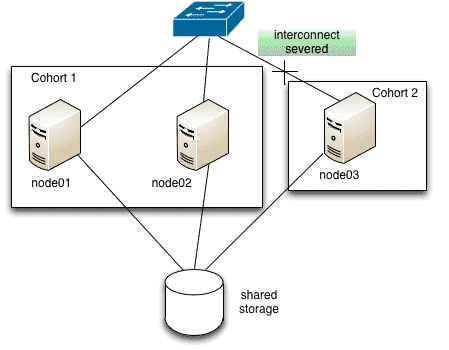
In a split brain situation, voting disk will be used to determine
which node(s) survive and which node(s) will be evicted.
Q3. What do you understand by rolling upgrade?
Answer:
A rolling patch refers to the cluster binaries being applied on the up and
running databases of RAC environment. The cluster nodes are rolled one after
another where the patched node is unavailable whereas all other instances are
in open state.
Q4. What do you understand by cache fusion?
Answer:
Oracle RAC transfers data blocks from the buffer cache of one instance to the buffer cache of another instance across the cluster interconnect.
Oracle RAC transfers data blocks from the buffer cache of one instance to the buffer cache of another instance across the cluster interconnect.
Q3) What
is the difference between Crash recovery and Instance recovery?
Ans. When an instance crashes in a single node database on
startup a crash recovery takes place. In a RAC environment the same recovery
for an instance is performed by the surviving nodes called Instance recovery.
Q4) What
is the interconnect used for?
Ans. It is a private network which is used to ship data blocks from one instance to
another for cache fusion. The physical data blocks as well as data
dictionary blocks are shared across this interconnect.
Q5) How
do you determine what protocol is being used for Interconnect traffic?
Ans. One of the ways is to look at the database alert log for
the time period when the database was started up.
Q6) What
methods are available to keep the time synchronized on all nodes in the
cluster?
Ans. Either the Network Time Protocol(NTP) can be configured or
in 11gr2, Cluster Time Synchronization Service (CTSS) can be used.
Q7) What
files components in RAC must reside on shared storage?
Ans. Spfiles, ControlFiles, Datafiles and Redolog files should
be created on shared storage.
Q8) Where
does the Clusterware write when there is a network or Storage missed heartbeat?
Ans. The network ping failure is written in $CRS_HOME/log
Q9) How
do you find out what OCR backups are available?
Ans. The ocrconfig -showbackup can be run to
find out the automatic and manually run backups.
Q10) If
your OCR is corrupted what options do have to resolve this?
Ans. You can use either the logical or the physical OCR backup
copy to restore the Repository.
Q12) What
is a VIP in RAC use for?
Ans. It is an alternate Virtual
IP address assigned to each node in a cluster. During a node failure the
VIP of the failed node moves to the surviving node and pass this info to the
application that the node has gone down. Without VIP, the application will wait
for TCP timeout and then find out that the session is no longer live due to the
failure
Q13) How
do we know which database instances are part of a RAC cluster?
Ans. You can query the V$ACTIVE_INSTANCES view to determine the
member instances of the RAC cluster.
Q14) What
is OCLUMON used for in a cluster environment?
Ans. The Cluster Health Monitor (CHM) stores operating system metrics in the CHM repository for all nodes
in a RAC cluster. It stores information on CPU, memory, process, network and
other OS data, this information can later be retrieved and used to troubleshoot
and identify any cluster related issues. It is a default component of the 11gr2
grid install. The data is stored in the
master repository and replicated to a standby repository on a different node.
Q17) What
is the default memory allocation for ASM?
Ans. In 10g the default SGA size is 1G in 11g it is set to 256M
and in 12c ASM it is set back to 1G.
Q22) What
are some of the RAC specific parameters?
Ans. Some of the RAC parameters are:
1.
CLUSTER_DATABASE
2.
CLUSTER_DATABASE_INSTANCE
3.
INSTANCE_TYPE (RDBMS or ASM)
4.
ACTIVE_INSTANCE_COUNT
5.
UNDO_MANAGEMENT
Q24) What components of the Grid should I back up?
Ans. The backups
should include OLR, OCR and ASM Metadata
Q25) Is there an easy way to verify the inventory for all
remote nodes
Ans. You can run the
OPATCH LSINVENTORY -ALL_NODES command from a single node to look at the
inventory details for all nodes in the cluster.
1) Mention what is cluster?
A cluster is referred to a group of independent but connected servers
that behaves as a single system.
2) Mention what is Oracle Real
Application Clusters?
RAC or Real Application Cluster is a component
of the database product that enables the database
to be installed across multiple servers. Oracle RAC uses Oracle Clusterware for the infrastructure to bind
multiple servers, so they operate as a single system.
3) Mention what are the main
components of an Oracle RAC system?
The main elements of an Oracle RAC system are,
·
Shared disk system
·
Oracle Clusterware
·
Cluster Interconnects
·
Oracle Kernel Components
4) Mention what are the
benefits of Oracle RAC?
Benefits of RAC is that
·
Business Continuity
and High Availability
·
Workload Management
with least expense
·
Agility and
Scalability
·
System management and
Standardized deployment
5) Mention what are the file
storage options provided by Oracle Database for Oracle RAC?
The file storage options provided by Oracle
Database for Oracle RAC are,
·
Automatic Storage
Management (ASM)
·
OCFS2 and Oracle
Cluster File System (OCFS)
·
A network file system
·
Raw devices
6) Mention what is the volume
management techniques used in Oracle RAC?
Volume management techniques used in Oracle
RAC is that,
·
Oracle RAC provides
dynamic volume manager. It has a file system that consists of information of
the cluster file system
·
Cluster file system in
Oracle is known as OCFS. It has the connection with the databases that provide
raw devices and command line features.
9) Mention what are the key
characteristics of RAC or why to use RAC?
The key characteristics of RAC are,
·
Reliability:
Eliminates the database server from a single point of failure. If an instance
fails, the remaining instances in the cluster remain active and open.
·
Error Detection: Provides fast detection of problems in the environment. It
automatically recovers from failures even before user’s notice that a failure
has occurred.
·
Recoverability:
Easy to recover from various types of failures.
·
Continuous Operations: provides continuous service for both unplanned and planned
outages
11) Mention what is the difference
between single instance environment and RAC environment?
|
Single Instance Environment
|
RAC Environment
|
|
· Instance has
its own SGA (System Global Area)
|
· Each instance
has its own SGA
|
|
· Datafiles and
control files are accessed by only one instance
|
· Datafiles and
control files shared by all instances
|
|
· Online redo
logfile dedicated for read/write to only one instance
|
· Online redo
logfile only one instance can write, but other instances can read during
recovery and archiving.
|
|
· Flash recovery
log accessed by only one instance
|
· Flash
recovery log shared by all instances
|
|
· Alert log and
trace files dedicated to the instance
|
· Alert log and
trace files are private to each instance. Other instance never write or read
to those files
|
Q6. Discuss OEM tools?
Answer:
There are basically
two OEM tools: Database Control and Grid Control
Database control:
A tool used for managing graphics in such a way that the
database is able to make its configurations manually
The server pools are also managed as a result of Oracle
Clusterware. The provision is made such that it can be operated and managed
from one location itself
The services related
to Oracle RAC and Oracle Clusterware can be managed by making use of Database
control tool
Grid control:
It is a system for delivering a centralized level of
management along with administration and
configuration related capabilities.
Higher efficiency and reduction in cost for plans are also
provided by Grid control
Q9. The shared
storage in RAC consists of some files. Name them. Also, what would be your
approach to monitor the protocol being used for interconnect traffic?
Answer:
Control files,
Spfiles, Redolog file, and Datafiles are the ones present in the shared
storage.
Looking and monitoring
the database alert log closely for the stipulated time period especially
when the database was initially started
up will help you determine the protocol.
Q3. What is a CFS?
A cluster File System (CFS) is a file system that may be accessed (read and write) by
all members in a cluster at the same time. This implies that all members of
a cluster have the same view
Q7. Where are the Clusterware files stored on a RAC
environment?
The Clusterware is installed on each node (on an Oracle
Home) and on the shared disks (the voting disks and the CSR file)
Q8. What command would you use to check the availability of
the RAC system?
crs_stat -t -v (-t -v are optional)
Q9. What is the minimum number of instances you need to have
in order to create a RAC?
You can create a RAC with just one server.
Q10. Name two specific RAC background processes
RAC processes are: LMON, LMDx, LMSn, LKCx and DIAG.
Oracle RAC
Interview Questions & Answers
2. Where are the database
software files stored on a RAC environment?
The base software is installed on each node of the cluster and
the
database storage on the shared disks.
database storage on the shared disks.
6. What is an OCFS2?
The OCFS2 is the Oracle (version 2) Cluster File System which can be used for the Oracle Real Application Cluster.
The OCFS2 is the Oracle (version 2) Cluster File System which can be used for the Oracle Real Application Cluster.
7. Which files can be placed on
an Oracle Cluster File System?
- Oracle Software installation (Windows only)
- Oracle files (control files, datafiles, redo logs, files described by the bfile datatype)
- Shared configuration files (spfile)
- OCR and voting disk
- Files created by Oracle during runtime
- Oracle Software installation (Windows only)
- Oracle files (control files, datafiles, redo logs, files described by the bfile datatype)
- Shared configuration files (spfile)
- OCR and voting disk
- Files created by Oracle during runtime
Note: There are some platform specific limitations.
8. Do you know another Cluster
Vendor?
HP Tru64 Unix, Veritas, Microsoft
HP Tru64 Unix, Veritas, Microsoft
9. How is possible to install a
RAC if we don’t have a CFS?
This is possible by using a raw device.
This is possible by using a raw device.
10. What is a raw device?
A raw device is a disk drive that does not yet have a file system set up. Raw devices are used for Real Application Clusters since they enable the sharing of disks.
A raw device is a disk drive that does not yet have a file system set up. Raw devices are used for Real Application Clusters since they enable the sharing of disks.
11. What is a raw partition?
A raw partition is a portion of a physical disk that is accessed at the lowest possible level. A raw partition is created when an extended partition is created, and logical partitions are assigned to it without any formatting. Once formatting is complete, it is called cooked partition.
A raw partition is a portion of a physical disk that is accessed at the lowest possible level. A raw partition is created when an extended partition is created, and logical partitions are assigned to it without any formatting. Once formatting is complete, it is called cooked partition.
12. When to use CFS over raw?
A CFS offers:
- Simpler management
- Use of Oracle Managed Files with RAC
- Single Oracle Software installation
- Auto extend enabled on Oracle datafiles
- Uniform accessibility to archive logs in case of physical node failure
- With Oracle_Home on CFS, when you apply Oracle patches CFS guarantees that the updated Oracle_Home is visible to all nodes in the cluster.
A CFS offers:
- Simpler management
- Use of Oracle Managed Files with RAC
- Single Oracle Software installation
- Auto extend enabled on Oracle datafiles
- Uniform accessibility to archive logs in case of physical node failure
- With Oracle_Home on CFS, when you apply Oracle patches CFS guarantees that the updated Oracle_Home is visible to all nodes in the cluster.
Note: This option is very
dependent on the availability of a CFS on your platform.
13. When to use raw over CFS?
- Always when CFS is not available or not supported by Oracle.
- The performance is very, very important: Raw devices offer best performance without any intermediate layer between Oracle and the disk.
Note: Auto extend fails on raw devices if the space is exhausted. However, the space could be added online if needed.
- Always when CFS is not available or not supported by Oracle.
- The performance is very, very important: Raw devices offer best performance without any intermediate layer between Oracle and the disk.
Note: Auto extend fails on raw devices if the space is exhausted. However, the space could be added online if needed.
14. What CRS is?
Oracle RAC 10g Release 1 introduced Oracle Cluster Ready Services (CRS), a platform-independent set of system services for cluster environments. In Release 2, Oracle has renamed this product to Oracle Clusterware.
Oracle RAC 10g Release 1 introduced Oracle Cluster Ready Services (CRS), a platform-independent set of system services for cluster environments. In Release 2, Oracle has renamed this product to Oracle Clusterware.
16. Why we need to have
configured SSH or RSH on the RAC nodes?
SSH (Secure Shell,10g+) or RSH (Remote Shell, 9i+) allows “oracle” UNIX account connecting to another RAC node and copy/ run commands as the local “oracle” UNIX account.
SSH (Secure Shell,10g+) or RSH (Remote Shell, 9i+) allows “oracle” UNIX account connecting to another RAC node and copy/ run commands as the local “oracle” UNIX account.
17. Is the SSH, RSH needed for
normal RAC operations?
No. SSH or RSH are needed only for RAC, patch set installation and clustered database creation.
No. SSH or RSH are needed only for RAC, patch set installation and clustered database creation.
18. Do we have to have Oracle
RDBMS on all nodes?
Each node of a cluster that is being used for a clustered database will typically have the RDBMS and RAC software loaded on it, but not actual data files (these need to be available via shared disk).
Each node of a cluster that is being used for a clustered database will typically have the RDBMS and RAC software loaded on it, but not actual data files (these need to be available via shared disk).
19. What are the restrictions
on the SID with a RAC database? Is it limited to 5 characters?
The SID prefix in 10g Release 1 and prior versions was restricted to five characters by install/ config tools so that an ORACLE_SID of up to max of 5+3=8 characters can be supported in a RAC environment. The SID prefix is relaxed up to 8 characters in 10g Release 2, see bug 4024251 for more information.
The SID prefix in 10g Release 1 and prior versions was restricted to five characters by install/ config tools so that an ORACLE_SID of up to max of 5+3=8 characters can be supported in a RAC environment. The SID prefix is relaxed up to 8 characters in 10g Release 2, see bug 4024251 for more information.
20. Does Real Application
Clusters support heterogeneous platforms?
The Real Application Clusters do not support heterogeneous platforms in the same cluster.
The Real Application Clusters do not support heterogeneous platforms in the same cluster.
21. Are there any issues for
the interconnect when sharing the same switch as the public network by using
VLAN to separate the network?
RAC and Clusterware deployment best practices suggests that the interconnect (private connection) be deployed on a stand-alone, physically separate, dedicated switch. On big network the connections could be instable.
RAC and Clusterware deployment best practices suggests that the interconnect (private connection) be deployed on a stand-alone, physically separate, dedicated switch. On big network the connections could be instable.
22. What is the Load Balancing Advisory?
To assist in the balancing of application workload across designated resources, Oracle Database 10g Release 2 provides the Load Balancing Advisory. This Advisory monitor the current workload activity across the cluster and for each instance where a service is active; it provides a percentage value of how much of the total workload should be sent to this instance as well as service quality flag.
To assist in the balancing of application workload across designated resources, Oracle Database 10g Release 2 provides the Load Balancing Advisory. This Advisory monitor the current workload activity across the cluster and for each instance where a service is active; it provides a percentage value of how much of the total workload should be sent to this instance as well as service quality flag.
23. How many nodes are
supported in a RAC Database?
With 10g Release 2, we support 100 nodes in a cluster using Oracle Clusterware, and 100 instances in a RAC database. Currently DBCA has a bug where it will not go beyond 63 instances. There is also a documentation bug for the max-instances parameter. With 10g Release 1 the Maximum is 63.
With 10g Release 2, we support 100 nodes in a cluster using Oracle Clusterware, and 100 instances in a RAC database. Currently DBCA has a bug where it will not go beyond 63 instances. There is also a documentation bug for the max-instances parameter. With 10g Release 1 the Maximum is 63.
24. What is the Cluster
Verification Utiltiy (cluvfy)?
The Cluster Verification Utility (CVU) is a validation tool that you can use to check all the important components that need to be verified at different stages of deployment in a RAC environment.
The Cluster Verification Utility (CVU) is a validation tool that you can use to check all the important components that need to be verified at different stages of deployment in a RAC environment.
25. What versions of the
database can I use the cluster verification utility (cluvfy) with?
The cluster verification utility is release with Oracle Database 10g Release 2 but can also be used with Oracle Database 10g Release 1.
The cluster verification utility is release with Oracle Database 10g Release 2 but can also be used with Oracle Database 10g Release 1.
26. If I am using Vendor
Clusterware such as Veritas, IBM, Sun or HP, do I still need Oracle Clusterware
to run Oracle RAC 10g?
Yes. When certified, you can use Vendor Clusterware however you must still install and use Oracle Clusterware for RAC. Best Practice is to leave Oracle Clusterware to manage RAC. For details see Metalink Note 332257.1 and for Veritas SFRAC see 397460.1.
Yes. When certified, you can use Vendor Clusterware however you must still install and use Oracle Clusterware for RAC. Best Practice is to leave Oracle Clusterware to manage RAC. For details see Metalink Note 332257.1 and for Veritas SFRAC see 397460.1.
27. Is RAC on VMWare supported?
Yes.
Yes.
28. What is hangcheck timer used for ?
The hangcheck timer checks regularly the health of the system. If the system hangs or stop the node will be restarted automatically.
There are 2 key parameters for this module:
-> hangcheck-tick: this parameter defines the period between checks of system health. The default value is 60 seconds; Oracle recommends setting it to 30seconds.
-> hangcheck-margin: this defines the maximum hang delay that should be tolerated before hangcheck-timer resets the RAC node.
The hangcheck timer checks regularly the health of the system. If the system hangs or stop the node will be restarted automatically.
There are 2 key parameters for this module:
-> hangcheck-tick: this parameter defines the period between checks of system health. The default value is 60 seconds; Oracle recommends setting it to 30seconds.
-> hangcheck-margin: this defines the maximum hang delay that should be tolerated before hangcheck-timer resets the RAC node.
29. Is the hangcheck timer
still needed with Oracle RAC 10g?
Yes.
Yes.
30. What files can I put on
Linux OCFS2?
For optimal performance, you should only put the following files on Linux OCFS2:
- Datafiles
- Control Files
- Redo Logs
- Archive Logs
- Shared Configuration File (OCR)
- Voting File
- SPFILE
For optimal performance, you should only put the following files on Linux OCFS2:
- Datafiles
- Control Files
- Redo Logs
- Archive Logs
- Shared Configuration File (OCR)
- Voting File
- SPFILE
31. Is it possible to use ASM for the OCR and voting disk?
No, the OCR and voting disk must be on raw or CFS (cluster file system).
No, the OCR and voting disk must be on raw or CFS (cluster file system).
32. Can I change the name of my
cluster after I have created it when I am using Oracle Clusterware?
No, you must properly uninstall Oracle Clusterware and then re-install.
No, you must properly uninstall Oracle Clusterware and then re-install.
33. What the O2CB is?
The O2CB is the OCFS2 cluster stack. OCFS2 includes some services. These services must be started before using OCFS2 (mount/ format the file systems).
The O2CB is the OCFS2 cluster stack. OCFS2 includes some services. These services must be started before using OCFS2 (mount/ format the file systems).
34. What the OCR file is used
for?
OCR is a file that manages the cluster and RAC configuration.
OCR is a file that manages the cluster and RAC configuration.
35. What the Voting Disk file
is used for?
The voting disk is nothing but a file that contains and manages information of all the node memberships.
The voting disk is nothing but a file that contains and manages information of all the node memberships.
36. What is the recommended
method to make backups of a RAC environment?
RMAN to make backups of the database, and to backup your voting
disk and hard copies of the OCR file.
40. Can you have many database versions in the same RAC?
Yes, but Clusterware version must be greater than the greater database version.
Yes, but Clusterware version must be greater than the greater database version.
41. What was RAC previous
name before it was called RAC?
OPS: Oracle Parallel Server
42. What RAC component is
used for communication between instances?
Private Interconnect.
43. What is the
difference between normal views and RAC views?
A RAC view has the prefix ‘G’. For example, GV$SESSION instead
of V$SESSION
44. Which command will we
use to manage (stop, start) RAC services in command-line mode?
srvctl
srvctl
45. How many alert logs
exist in a RAC environment?
A- One for each instance.
A- One for each instance.
46. What are Oracle Clusterware Components
Voting Disk — Oracle RAC uses the voting disk to manage cluster membership by way of a
health check and arbitrates cluster ownership among the instances in case
of network failures. The voting disk must reside on shared disk.
Oracle Cluster Registry (OCR) — Maintains cluster configuration information
as well as configuration information about any cluster database within the
cluster. The OCR must reside on shared disk that is accessible by all of
the nodes in your cluster
47. How do you backup voting
disk
#dd if=voting_disk_name of=backup_file_name
48. How do I identify the
voting disk location
#crsctl query css votedisk
49. How do I identify the OCR
file location
check /var/opt/oracle/ocr.loc or /etc/ocr.loc ( depends upon
platform)
or
#ocrcheck
or
#ocrcheck
50. What is SCAN?
Single Client Access Name (SCAN) is s a new Oracle Real
Application Clusters (RAC) 11g Release 2 feature that provides a single name
for clients to access an Oracle Database running in a cluster. The benefit is
clients using SCAN do not need to change if you add or remove nodes in the
cluster.
1) What is the use of
RAC?
Ans: Oracle RAC allows multiple computers to run Oracle RDBMS software
simultaneously while accessing a single database, thus providing clustering.
2) What are Oracle Cluster ware and Daemon Processes and what they do?
Ans: ocssd, crsd, evmd, oprocd, racgmain, racgimon
3) What are the special background processes for RAC (or) what is difference in stand-alone database & RAC database background processes?
Ans: DIAG, LCKn, LMD, LMSn, LMON
4) What are structural changes in 11g R2 RAC?
Ans: Grid & ASM are on one home, Voting disk & ocrfile can be on the ASM, SCAN, By using srvctl, we can manage disk groups, home, ons, eons, filesystem, srvpool, server, scan, scan_listener, gns, vip, oc4j,GSD
7) What are the Clusterware Components?
Ans:
2) What are Oracle Cluster ware and Daemon Processes and what they do?
Ans: ocssd, crsd, evmd, oprocd, racgmain, racgimon
3) What are the special background processes for RAC (or) what is difference in stand-alone database & RAC database background processes?
Ans: DIAG, LCKn, LMD, LMSn, LMON
4) What are structural changes in 11g R2 RAC?
Ans: Grid & ASM are on one home, Voting disk & ocrfile can be on the ASM, SCAN, By using srvctl, we can manage disk groups, home, ons, eons, filesystem, srvpool, server, scan, scan_listener, gns, vip, oc4j,GSD
7) What are the Clusterware Components?
Ans:
Voting Disk - Oracle RAC
uses the voting disk to manage cluster membership by way of a health check and
arbitrates cluster ownership among the instances in case of network failures.
The voting disk must reside on shared disk.
Oracle Cluster Registry
(OCR) - Maintains cluster configuration information as well as configuration
information about any cluster database within the cluster. The OCR must reside
on shared disk that is accessible by all the nodes in your cluster.
The daemon OCSSd manages
the configuration info in OCR and maintains the changes to cluster in the
registry.
Virtual IP (VIP) - When
a node fails, the VIP associated with it is automatically failed over to some
other node and new node re-arps the world indicating a new MAC address for the
IP. Subsequent packets sent to the VIP go to the new node, which will send
error RST packets back to the clients.
This results in the clients getting errors immediately.
crsd – Cluster Resource
Services Daemon
cssd – Cluster Synchronization Services Daemon
evmd – Event Manager Daemon
oprocd / hangcheck_timer – Node hang detector
cssd – Cluster Synchronization Services Daemon
evmd – Event Manager Daemon
oprocd / hangcheck_timer – Node hang detector
8) What is OCR file?
Ans: RAC configuration
information repository that manages information about the cluster node list and
instance-to-node mapping information. The OCR also manages information about
Oracle Clusterware resource profiles for customized applications. Maintains
cluster configuration information as well as configuration information about
any cluster database within the cluster.
The OCR must reside on
shared disk that is accessible by all the nodes in your cluster. The daemon
OCSSd manages the configuration info in OCR and maintains the changes to
cluster in the registry.
9) What is Voting disk and how many files should be there?
Ans: Voting Disk File is a file on the shared cluster system or a shared raw device file. Oracle Clusterware uses the voting disk to determine which instances are members of a cluster. Voting disk is akin to the quorum disk, which helps to avoid the split-brain syndrome. Oracle RAC uses the voting disk to manage cluster membership by way of a health check and arbitrates cluster ownership among the instances in case of network failures. The voting disk must reside on shared disk.
10) How to take backup of OCR file?
Ans: #ocrconfig -manualbackup,
9) What is Voting disk and how many files should be there?
Ans: Voting Disk File is a file on the shared cluster system or a shared raw device file. Oracle Clusterware uses the voting disk to determine which instances are members of a cluster. Voting disk is akin to the quorum disk, which helps to avoid the split-brain syndrome. Oracle RAC uses the voting disk to manage cluster membership by way of a health check and arbitrates cluster ownership among the instances in case of network failures. The voting disk must reside on shared disk.
10) How to take backup of OCR file?
Ans: #ocrconfig -manualbackup,
#ocrconfig -export
file_name.dmp,
#ocrdump -backupfile
my_file,
$cp -p -R
/u01/app/crs/cdata /u02/crs_backup/ocrbackup/RAC1
11) How to recover OCR file?
Ans:
#ocrconfig -restore backup_file.ocr
#ocrconfig -import file_name.dmp
12) what is Local OCR?
Ans:
/etc/oracle/local.ocr
/var/opt/oracle/local.ocr
13) How to check backup of OCR files?
Ans:
#ocrconfig –showbackup
14) How to take backup of voting file?
Ans: dd if=/u02/ocfs2/vote/VDFile_0 of=$ORACLE_BASE/bkp/vd/VDFile_0
crsctl backup css votedisk -- from 11g R2
11) How to recover OCR file?
Ans:
#ocrconfig -restore backup_file.ocr
#ocrconfig -import file_name.dmp
12) what is Local OCR?
Ans:
/etc/oracle/local.ocr
/var/opt/oracle/local.ocr
13) How to check backup of OCR files?
Ans:
#ocrconfig –showbackup
14) How to take backup of voting file?
Ans: dd if=/u02/ocfs2/vote/VDFile_0 of=$ORACLE_BASE/bkp/vd/VDFile_0
crsctl backup css votedisk -- from 11g R2
16) What is the location
of OCR file?
check /var/opt/oracle/ocr.loc or /etc/ocr.loc
Ans: # ocrcheck
check /var/opt/oracle/ocr.loc or /etc/ocr.loc
Ans: # ocrcheck
17) If voting disk or OCR
file got corrupted and don’t have backups so how to get them?
Ans: We have to install Clusterware.
18) who will manage OCR files?
Ans: cssd will manage OCR.
19) who will take backup of OCR files?
Ans: crsd will take backup.
21) what are various IPs used in RAC? And How may IPs we need in RAC?
Ans: Public IP, Private IP, Virtual IP, SCAN IP
24) How many Scan Listeners will be running?
Ans: Three SCAN listeners only.
25) What is FAN?
Ans: Applications can use Fast Application Notification (FAN) to enable rapid failure detection, balancing of connection pools after failures, and re-balancing of connection pools when failed components are repaired.
The FAN process uses system events that Oracle publishes when cluster servers become unreachable or if network interfaces fail.
26) What is FCF?
Ans: Fast Connection Failover provides high availability to FAN integrated clients, such as clients that use JDBC, OCI, or ODP.NET. If you configure the client to use fast connection failover, then the client automatically subscribes to FAN events and can react to database UP and DOWN events. In response, Oracle gives the client a connection to an active instance that provides the requested database service.
27) What is TAF and TAF policies?
Ans: Transparent Application Failover (TAF) - A runtime failover for high availability environments,
such as Real Application Clusters and Oracle Real Application Clusters Guard, TAF refers to the failover and re-establishment of application-to-service connections. It enables client applications to automatically reconnect to the database if the connection fails, and optionally resume a SELECT statement that was in progress. This reconnect happens automatically from within the Oracle Call Interface (OCI) library.
18) who will manage OCR files?
Ans: cssd will manage OCR.
19) who will take backup of OCR files?
Ans: crsd will take backup.
21) what are various IPs used in RAC? And How may IPs we need in RAC?
Ans: Public IP, Private IP, Virtual IP, SCAN IP
24) How many Scan Listeners will be running?
Ans: Three SCAN listeners only.
25) What is FAN?
Ans: Applications can use Fast Application Notification (FAN) to enable rapid failure detection, balancing of connection pools after failures, and re-balancing of connection pools when failed components are repaired.
The FAN process uses system events that Oracle publishes when cluster servers become unreachable or if network interfaces fail.
26) What is FCF?
Ans: Fast Connection Failover provides high availability to FAN integrated clients, such as clients that use JDBC, OCI, or ODP.NET. If you configure the client to use fast connection failover, then the client automatically subscribes to FAN events and can react to database UP and DOWN events. In response, Oracle gives the client a connection to an active instance that provides the requested database service.
27) What is TAF and TAF policies?
Ans: Transparent Application Failover (TAF) - A runtime failover for high availability environments,
such as Real Application Clusters and Oracle Real Application Clusters Guard, TAF refers to the failover and re-establishment of application-to-service connections. It enables client applications to automatically reconnect to the database if the connection fails, and optionally resume a SELECT statement that was in progress. This reconnect happens automatically from within the Oracle Call Interface (OCI) library.
28) what are nodeapps?
Ans: VIP, listener, ONS, GSD
Ans: VIP, listener, ONS, GSD
29) How to do load
balancing in RAC?
Client Side Connect-Time Load Balance:
The client load balancing feature enables clients to randomize connection requests among the listeners.
This is done by client Tnsnames Parameter: LOAD_BALANCE.
The (load_balance=yes) instructs SQLNet to progress through the list of listener addresses in the address_list section of the net service name in a random sequence. When set to OFF, instructs SQLNet to try the addresses sequentially until one succeeds.
Client Side Connect-Time failover
This is done by client Tnsnames Parameter: FAILOVER
The (failover=on) enables clients to connect to another listener if the initial connection to the first listener fails. Without connect-time failover, Oracle Net attempts a connection with only one listener.
Server Side Listener Connection Load Balancing.
Client Side Connect-Time Load Balance:
The client load balancing feature enables clients to randomize connection requests among the listeners.
This is done by client Tnsnames Parameter: LOAD_BALANCE.
The (load_balance=yes) instructs SQLNet to progress through the list of listener addresses in the address_list section of the net service name in a random sequence. When set to OFF, instructs SQLNet to try the addresses sequentially until one succeeds.
Client Side Connect-Time failover
This is done by client Tnsnames Parameter: FAILOVER
The (failover=on) enables clients to connect to another listener if the initial connection to the first listener fails. Without connect-time failover, Oracle Net attempts a connection with only one listener.
Server Side Listener Connection Load Balancing.
With server-side load
balancing, the listener directs a connection request to the best instance currently
providing the service.
Init parameter remote_listener should be set. When set, each instance registers with the TNS listeners running on all nodes within the cluster.
There are two types of server-side load balancing:
Load Based — Server side load balancing redirects connections by default depending on node load. This id default.
Session Based — Session based load balancing takes into account the number of sessions connected to each node and then distributes the connections to balance the number of sessions across the different nodes.
Init parameter remote_listener should be set. When set, each instance registers with the TNS listeners running on all nodes within the cluster.
There are two types of server-side load balancing:
Load Based — Server side load balancing redirects connections by default depending on node load. This id default.
Session Based — Session based load balancing takes into account the number of sessions connected to each node and then distributes the connections to balance the number of sessions across the different nodes.
Transparent
Application Failover(TAF):
Transparent Application Failover (TAF) is a feature of the Oracle Call Interface (OCI) driver at client side. It enables the application to automatically reconnect to a database, if the database instance to which the connection is made fails. In this case, the active transactions roll back.
Tnsnames Parameter: FAILOVER_MODE
e.g (failover_mode=(type=select)(method=basic))
Failover Mode Type can be Either SESSION or SELECT.
Session failover will have just the session to failed over to the next available node. With SELECT, the select query will be resumed.
TAF can be configured with just server side service settings by using dbms_service package.
Fast Connection Failover (FCF):
Fast Connection Failover
is a feature of Oracle clients that have integrated with FAN HA Events.
Oracle JDBC Implicit Connection Cache, Oracle Call Interface (OCI), and Oracle Data Provider for .Net (ODP.Net) include fast connection failover.
With fast connection failover, when a down event is received, cached connections affected by the down event are immediately marked invalid and cleaned up.
31) how to file out the nodes in cluster (or) how to find out the master node?
Oracle JDBC Implicit Connection Cache, Oracle Call Interface (OCI), and Oracle Data Provider for .Net (ODP.Net) include fast connection failover.
With fast connection failover, when a down event is received, cached connections affected by the down event are immediately marked invalid and cleaned up.
31) how to file out the nodes in cluster (or) how to find out the master node?
Ans: # olsnodes --
Which ever displayed first, is the master node of the cluster.
select MASTER_NODE from
v$ges_resource;
To find out which is the master node, you can see ocssd.log file and search for "master node number".
32) How to know the public IPs, Private IPs, VIPs in RAC?
Ans:
# olsnodes -n -p -i
node1-pub 1 node1-prv node1-vip
node2-pub 2 node2-prv node2-vip
33) What utility is used to start DB or Instance?
Ans:
srvctl start database –d database_name
srvctl start instance –d database_name –i instance_name
34) How can you shutdown single instance?
Ans:
Change cluster_database=false
srvctl stop instance –d database_name –i instance_name
To find out which is the master node, you can see ocssd.log file and search for "master node number".
32) How to know the public IPs, Private IPs, VIPs in RAC?
Ans:
# olsnodes -n -p -i
node1-pub 1 node1-prv node1-vip
node2-pub 2 node2-prv node2-vip
33) What utility is used to start DB or Instance?
Ans:
srvctl start database –d database_name
srvctl start instance –d database_name –i instance_name
34) How can you shutdown single instance?
Ans:
Change cluster_database=false
srvctl stop instance –d database_name –i instance_name
35) What is HAS (High
Availability Service) and the Commands?
Ans: HAS includes ASM and database instance and listeners.
crsctl check has
crsctl config has
crsctl disable has
crsctl enable has
crsctl query has releaseversion
crsctl query has softwareversion
crsctl start has
crsctl stop has [-f]
37) What is fencing?
Ans: HAS includes ASM and database instance and listeners.
crsctl check has
crsctl config has
crsctl disable has
crsctl enable has
crsctl query has releaseversion
crsctl query has softwareversion
crsctl start has
crsctl stop has [-f]
37) What is fencing?
Ans: I/O fencing
prevents updates by failed instances and detecting failure and preventing split
brain in cluster.When a cluster node fails, the failed node needs to be fenced
off from all the shared disk devices or diskgroups. This methodology is called
I/O Fencing, sometimes called Disk Fencing or failure fencing.
38) Why Clusterware installed in root?
Oracle Clusterware works closely with the operating system, system administrator access is required for some of the installation tasks. In addition, some of the Oracle Clusterware processes must run as the special operating system user, root.
39) What are the initialization parameters that must have same value for every instance in an Oracle RAC database?
Ans:ACTIVE_INSTANCE_COUNT
ARCHIVE_LAG_TARGET
COMPATIBLE
CLUSTER_DATABASE
CLUSTER_DATABASE_INSTANCE
CONTROL_FILES
DB_BLOCK_SIZE
DB_DOMAIN
DB_FILES
DB_NAME
DB_RECOVERY_FILE_DEST
DB_RECOVERY_FILE_DEST_SIZE
DB_UNIQUE_NAME
INSTANCE_TYPE
PARALLEL_MAX_SERVERS
REMOTE_LOGIN_PASSWORD_FILE
UNDO_MANAGEMENT
38) Why Clusterware installed in root?
Oracle Clusterware works closely with the operating system, system administrator access is required for some of the installation tasks. In addition, some of the Oracle Clusterware processes must run as the special operating system user, root.
39) What are the initialization parameters that must have same value for every instance in an Oracle RAC database?
Ans:ACTIVE_INSTANCE_COUNT
ARCHIVE_LAG_TARGET
COMPATIBLE
CLUSTER_DATABASE
CLUSTER_DATABASE_INSTANCE
CONTROL_FILES
DB_BLOCK_SIZE
DB_DOMAIN
DB_FILES
DB_NAME
DB_RECOVERY_FILE_DEST
DB_RECOVERY_FILE_DEST_SIZE
DB_UNIQUE_NAME
INSTANCE_TYPE
PARALLEL_MAX_SERVERS
REMOTE_LOGIN_PASSWORD_FILE
UNDO_MANAGEMENT
Oracle Grid Infrastructure
Service
The
Oracle Grid Infrastructure for a standalone server is the Oracle software that
provides system support for an Oracle database including volume management,
file system, and automatic restart capabilities.
If
you plan to use Oracle Restart or Oracle Automatic Storage Management (Oracle
ASM), you must install Oracle Grid Infrastructure before installing your
database.
Oracle
Grid Infrastructure for a standalone server is the software that includes
Oracle Restart and Oracle ASM.
Oracle
combined the two infrastructure products into a single set of binaries that is
installed as the Oracle Grid Infrastructure home. Oracle Grid Infrastructure
should be installed before installing Oracle Database 11g Release 2.
Oracle RAC was started in 9i version
In 9i version of oracle its started as cluster manager
9i
——-> Cluster
manager
In 10gR1 version of oracle RAC changed to CRS S/W
10gR1
——-> CRS S/W
In 10gR2 version of oracle it named as Clusterware
10gR2
——-> Clusterware
11gR1
——-> Clusterware
In 11gR2 version of oracle clusterware changes to Grid
Infrastructure Services
11gR2
——-> Grid Infrastructure Services
In 11gR2, ASM and Oracle Clusterware are installed into a single
home directory called the Grid Infrastructure home.
Oracle Clusterware
·
Oracle Clusterware is: –
·
A key part of Oracle Grid Infrastructure
·
Integrated with Oracle Automatic Storage Management (ASM) – from
11gR2
·
The basis for ASM Cluster File System (ACFS) – from 11gR2
·
A foundation for Oracle Real Application Clusters (RAC)
·
A generalized cluster infrastructure for all kinds of
applications
Please
check below image to clear Idea on Clusterware
RAC Software Principles: –
Here
we are talking about 2 Node RAC Environment.
Here,
few additional background processes associated with a RAC instance.
These processes are primarily used to maintain database
coherency among each instance.
They are called as global resources: –
·
LMON:
Global Enqueue Service Monitor
·
LMD0:
Global Enqueue Service Daemon
·
LMSx:
Global Cache Service Processes, where x can range from 0 to j
·
LCK0:
Lock process
·
DIAG:
Diagnosability process
Main processes of Oracle Clusterware: –
·
CRSD and
RACGIMON: Are engines for high-availability operations
·
OCSSD:
Provides access to node membership and group services
·
EVMD:
Scans callout directory and invokes callouts in reactions to detected events
·
OPROCD: Is
a process monitor for the cluster
Other
Components / Resources: –
·
Automatic Storage Management (ASM) instances
·
RAC databases
·
Services and node applications.
RAC Software Storage Principles: –
The
Oracle Database 11g Real Application Clusters installation is a two-phase
installation.
In the first phase, you install Oracle
Clusterware. In
the second phase, you install the Oracle database software with RAC
components and create a cluster database.
Oracle Clusterware includes two important components: the voting
disk and the OCR.
Voting Disk :
The voting disk is a file that manages information about node
membership, each voting disk must be accessible by all nodes in the cluster.
If any node is not passing heart-beat across other node or voting
disk, then that node will be evicted by Voting disk.
Oracle Cluster Registry :
The OCR is a file that manages
cluster and Oracle RAC database configuration information such as RAC
database, listener, VIP, Scan IP & Services.
Note :
The Oracle Clusterware installation process creates the voting
disk and the OCR on shared storage.
Important lines of OCR & VOTING DISK :
If
you select the option for normal redundant copies during the installation
process, then Oracle Clusterware automatically maintains redundant copies of
these files to prevent the files from becoming single points of failure.
When you use normal redundancy, Oracle
Clusterware automatically maintains two copies of the OCR file and three copies
of the voting disk file.
We can store the software storage in two methods.
First Method :
Keeping
CRS_HOME,ASM_HOME and ORACLE_HOME in each and every node in a cluster.
In
above image CRS and ASM and ORACLE home locations kept under in both the Nodes.
In this case whenever a particular node goes down user can connect from
another node . Because all software is available at all the nodes in a cluster.
Here
we can achieve high availability on instance level.
Second Method :
Keeping
ORACLE_HOME and ASM_HOME in Shared Storage and CRS_HOME will be available
on all instances in a cluster.
In
Case of any patching or update activity we have downtime because of
ORACLE_HOME and ASM_HOME is in shared storage.
In
patching activity or update activity Oracle should be shut down in that case
users cant access database RAC database from Shared Storage.
RAC Software Storage Principles (Physical files) : –
The
primary difference between RAC storage and storage for single-instance Oracle
databases is that all data files in RAC must
reside on shared devices (either raw devices or cluster file systems) in order
to be shared by all the instances that access the same database.
You
must also create at least two redo log groups for each instance, and all the
redo log groups must also be stored on shared devices for instance or crash
recovery purposes.
Each
instance’s online redo log groups are called an instance’s thread of online
redo.
In
addition, you must create one shared undo tablespace for each instance for
using the recommended automatic undo management feature.
Each
instance’s undo tablespace must be shared by all other instances for recovery
purposes.
Archive
logs cannot be placed on raw devices because their names are automatically
generated and are different for each archive log. That is why they must be
stored on a file system.
If
you use cluster file system (CFS), it enables you to access these archive files
from any node at any time.
If
you do not use a CFS, you are always forced to make the archives available to
the other cluster members at the time of recovery—for example, by using a
network file system (NFS) across nodes.
If
you are using the recommended flash recovery area feature, then it must be
stored in a shared directory so that all instances can access it.
Note:
A
shared directory can be an ASM disk group, or a cluster file system.
what is the difference between RAC and
Grid computing?
Oracle Real Application Clusters (RAC) are
a database system involving a configuration of multiple hosts or servers joined
together with clustering software and accessing the shared disk storage
structures
The goal of Grid computing is to supply
high availability information sharing supported by an architecture with enough
resource allocation such that users can rely on getting as much information or
processing as they need on demand. Users no longer have to consider where
their data is being stored or where their data request are processed because
the database grid is supported by RAC and Oracle Clusterware and the storage
grid is supported by the Automatic Storage Management (ASM) system.
For those not yet comfortable with working
without a net on diagnostics and tuning of their system, Oracle Enterprise
Manager Grid Control (OEM) can be purchased to aid in the holistic oversight of
the grid.
OEM Tools
Oracle Enterprise
Manager (OEM or EM) is a set of web-based tools aimed
at managing software and hardware produced by Oracle Corporation
as well as by some non-Oracle entities
Oracle Enterprise Manager Monitoring
Overview
FAQs on OEM
Q. Is Oracle
Enterprise Manager a licensed Product?
A. Base EM Grid Control software is free, you can install EM
Grid Control on a separate server,
and then put EM agents on your target servers and start
basic monitoring. When you start using the EM Packs like Diagnostics/Tuning/Config.
Mgt/Change Mgt/Provisioning and Patch Automation Pack etc, you pay the license
fee per target server you use it on. For the cost please contact your local
sales rep.
Regarding the difference between what is considered the
licensable advanced monitoring (as opposed to basic monitoring), you can refer
to the following link http://download.oracle.com/docs/cd/E11857_01/license.111/e11987/database_management.htm#sthref12
for an idea of the features in each pack. If you use any of
these features, you need the license.
Another method to find out which pack is required is to use
the + link at the bottom of the EM console, this shows what packs are required
on each page.
Q. Can you give a NOTE
ID for us to follow on how to install the Oracle Enterprise management?
A. Please see Master Note for Grid Control 11.1.0.1.0
Installation and Upgrade [ID 1067438.1], this is on My Oracle Support.
Q. How much impact is
on performance if standalone Oracle Enterprise Manager
Database Control
Console is running on the Database Server machine?
A. There is an impact since after all it is a JVM application running on
your database server, and as per the old rule, database
servers should
not have applications on them. I recommend instead using
Grid Control on
a separate non-Exadata machine and just putting agents on
your Exadata
database servers.
Q. What is SQL
Profile, is it a separate pack? Do we need to purchase?
or is it in built
with Oracle Enterprise Edition?
A. SQL Profile is a feature of the EM Tuning Pack, so you
need to purchase
the Tuning Pack. You also need to get the Diagnostics pack
which works to
find issues first. These packs are not included in the
Oracle Enterprise
Edition database license.
Q. In EM 10g, all
components of Enterprise Manager Grid Control are bundled.
But in EM 11gR1, we
need to install Oracle Database, WebLogic Server and Grid Control
separately. What is
Oracle's philosophy behind this new installation scenario?
Please explain.
A. In EM 10g, database software was bundled but was often
behind the current
version, for e.g. 10.1 was used as the bundled database
version. Serious production
users never used the bundled version since they wanted to
use the more recent
database version which was better all around. So, the
decision was taken to
remove the bundled database software so there is no version
lag issue.
Likewise, for the application server software.
Q. Where can I get the Forrester report on OEM ROI ?
A. Go to http://www.oracle.com/oms/enterprisemanager11g and
click on economic benefits.
Q. Where can we get the Installers for Oracle Enterprise
Management?
A. From http://technet.oracle.com, please see
Downloads and select Enterprise Manager.
Q. With Oracle EM 11g, can it be possible to manage 9i, 10g
DB ?
A. Yes, most definitely. You can manage all 9i, 10g, 11g
Oracle databases.
You can also manage Application Servers, Hosts and
Applications etc. i.e. a lot
of other things.
Q. Migrate DB from Sun V series to Sun T series (having Chip
Multithread technology) shows
some batch processes running slow. Can Enterprise manager
Real Application Testing solve this type of issue?
A. Yes also use Diagnostics
and Tuning packs in addition to RAT. All three of these works together.
Q. Can I upgrade
directly an existing Oracle Enterprise Manager 10g Grid Control Release
(10.1.0.x) to Oracle Enterprise Manager 11g Grid Control Release 1
(11.1.0.1.0)?
A. Yes, upgrade is possible, your repository and targets
info will be retained. Please refer to EM documentation for the upgrade. Also
see the Master Note for Grid Control 11.1.0.1.0 Installation and Upgrade [ID
1067438.1].
Q. Can we perform Database Replay on captured workload in
Oracle Database 10g Release 2 (10.2.0.5.0)?
A. Not Database replay at this stage for 10g Rel 2
databases. You can use SPA for this purpose right now.
Q. How can we access the previous stored sql plans in 11g?
A. Use SQL Plan Management, refer to http://download.oracle.com/docs/cd/B28359_01/server.111/b28274/optplanmgmt.htm
This requires Tuning Pack to be licensed.
Q. We are looking at setting EM as a DR also. The database
repository part is easy i.e. Data guard. How is the OMS failover handled please
?
A. There is an entire section in the documentation for this
topic. Please see
This is the Oracle® Enterprise Manager Administration 11g
Release 1 (11.1.0.1) Manual
and this is Part (Section) III of the manual: Enterprise
Manager High Availability.
Q. Where can we see a list of all the EM Management Packs
available?
A. Please see http://www.oracle.com/technetwork/oem/grid-control/datasheets-091136.html which
shows a list of all the EM packs and their data sheets. This page also shows a
list of the Management Connectors and the System Monitoring Plug-ins available.
Q. Please give us another slides or any important doc or
tech doc you have about the Change Management for Databases.
A. Please see the datasheet
Q. what is basically diagnostics pack?
A. Please see http://www.oracle.com/technetwork/oem/grid-control/overview/diagnostics-pack-11gr2-datasheet-134502.pdf
Q. Does OEM come with a set of comprehensive reports,
particularly the DB space capacity?
A. Yes, EM Grid Control comes with many out of box reports
like space capacity. You can also add your own by copying an existing report.
Q. Can OEM manage non-Oracle database ? If yes can it manage
IBM DB2 running on System i ?
A. Using Plug-Ins, Enterprise Manager can monitor non-Oracle
databases like DB2. Please see
However, the EM agent is not available for certain platforms
like the IBM AS400.
Q.Does the AWR snapshot report also need the diagnostic pack
license?
A. Yes
Q. Can the diagnostics & tuning pack be disabled, if not
required? As it requires a separate license.
A. Yes it can be disabled in Enterprise Manager. In the 11g
version there is also a parameter to
disable it, CONTROL_MANAGEMENT_PACK_ACCESS
. But sooner or later all databases will need diagnosis and tuning.
Q. how can we
automate or is there any way to automate the change management process in terms
of distributed databases to stream line the metadata across all database?
A. Yes, it is excellent for this purpose. I suggest try out
the Change Management Pack. You can schedule schema propagations across databases.
Q. Can we compare an awr report 10g with awr report 11g
running the same database on different hosts in enterprise manager ?
A. Use SPA for this, which is a part of RAT option (Real
Application Testing).
Q. what is main
different between EM 10g and 11g
A. There are many
enhancements. One example is the new tab for My Oracle Support inside EM and is
fully integrated with Oracle Support. Also, it now can do provisioning of
Oracle database 11.2. Besides, the new version of EM is based on WebLogic server.
Q. Is there any bad impact of implementing SQL profile we
are not sure whether it will enhance performance?
A. EM will tell you what the impact of each profile is, then
you can decide. Normally choose a profile which will give you more than 60 to
70% gains.
Q. Is Grid Control 11g support Multiple OS like we have db
on LINUX,WINDOWS,AIX ...
A. yes you can put the EM agent on multiple OS.
Q. In DB Enterprise edition default have diagnostic pack? If
there need license other diagnostic pack for OEM?
A. DB Enterprise Edition by default does not include
Diagnostics pack. You need to purchase this pack and Tuning Pack separately.
Q. Which version of agent will be required to manage 10g
databases using 11g grid control
A. We recommend using the EM 11g agent. Always use the
latest agent as per your central EM installation version. This will help EM to
use all the latest features since the agent is responsible for doing a lot of
things.
Q. In this case what’s
the difference between Oracle Enterprise Manager and Grid Control ?
A. Database Control
is only for 1 database, Grid Control is installed separately
and for multiple
databases as well as application servers or applications etc.
Q. Is Real time SQL
tuning only available in 11g r2 or r1?
A. Works on 11gR1
databases onwards
Q. How does the schema changes are logged how is authorized
and unauthorized changes are determined
A. In a nutshell you need to set ENABLE_DDL_LOGGING at the db parameter level which requires a license
for the Change Mgt Pack. The
authorized and unauthorized changes are for configuration changes which
requires the Configuration Mgt Pack and
an EM Connector to ticket systems
like Remedy. Then EM can see which config change is authorized or not.
Q. What does real time schema change detection mean?
A. In a nutshell you need to set ENABLE_DDL_LOGGING at the
db parameter level which
requires a license for the Change Mgt Pack. You can then
track schema changes in real time
to identify unwanted or unplanned changes.
Q. Can we do an
automatic backup in oracle enterprise management?
A. If you mean RMAN
backups of databases, yes you can set up backups of any 9i/10g/11g db from EM
and schedule it to run at any time.
Q. pls tell again is license must for ADDM?
A. Yes you must purchase the Diagnostics pack license for
the target database even if you use ADDM at the command prompt or use the
views.
Q. For change
management pack what are important things for both database?
A. You only need the
EM Agent installed and a license to use the Change Management Pack on both
servers. That is all.
Q. In Automatic SQL tuning, can EM create Indexes
automatically or else can it send and alert(probably thru email) stating that
these are the columns in a table that can be indexed.
A. Indexes are not created automatically, only SQL Profiles.
The SQL Tuning results can be placed in a report and sent out.
Q. Is Oracle Database 11g Release 2 (11.2) supported with
Oracle Enterprise Manager 11gR1 Grid Control?
A. Yes. 11gR2 dbs. are supported. For example, Grid
Infrastructure Home in 11gR2 is supported in the Provisioning and Patch
Automation Pack in EM 11g.
Q. Do we need to have
a separate server of oracle enterprise repository?
A. Depending on
number of targets and type of EM activity. For a smaller number of targets and
normal monitoring
activity, you can put all components of EM on the same server. See the install
guide for some sizing info.
Q. What are the benefits of Installing Enterprise Manager
Patch Set Update (PSU)?
A. As normal, a PSU contains security patches and bug fixes.
Q. Hello how the performance management will have impact on
the Server side?
A. Since it is
inbuilt into the kernel, AWR and ADDM has minimum impact. Tuning pack may
do
workload analysis when running Access Advisor so recommend running
Access Advisor in low impact periods if
looking at large workloads, but in general, it is ok.
Q. Does it help to identify Network related issues?
A. Yes, using a network
management plugin from Entuity. Please see http://www.youtube.com/watch?v=n-p9rIoYe6U
Q. Does it support
Cluster Management?
A. Yes, Database RAC
clusters as well as application server clusters.
Q. How can we revert to previously used sql plans
A. Use Sql Plan Management, refer to http://download.oracle.com/docs/cd/B28359_01/server.111/b28274/optplanmgmt.htm
This requires Tuning Pack to be licensed.
Q. How can I get an alert regarding the results of Automatic
SQL tuning
A. When you set this up, reports are available.
Q. Can profiles be applied on development databases where
code keeps on changing
A. What is the point? Most useful for production databases
and staging databases, also on test databases.
Q. does oracle enterprise management same with oracle
enterprise management console for windows ?
A. No, it is different. The latest version is EM 11g which you
can download from technet.oracle.com, see Enterprise Manager under downloads.
Q. Does it support all type of processor?
A. Please see the EM certification matrix on My Oracle
Support. The note id is
Oracle Enterprise Manager Grid Control Certification Checker
[ID 412431.1]
Q. Grid or OEM is preferred
for large systems?
A. EM Grid Control is
recommended, the other is EM Database Control only for 1 db.
Q. Can we have multiple Instances of Oracle DB with
different version in the same box?
A. Yes, place in different Oracle Homes. Oracle is quite
flexible.
Q. what about ASM on oracle 11g ?
A. Yes, it can be managed by EM 11g.
Q.May I ask of what
is the basic requirements for the OEM server like memory,HDD, CPU? do I need a
server type pc to install this?
A. Yes, you need a
server. Guidelines for specs are in the installation manual. If there
are target servers
over a certain number like 30 and performance is slow, consider increasing
number of management
services i.e. have a second server for Grid control.
Q. is there any way
to ease and time saving process across data migration from production to
test database, other than
traditional logical backup and recovery method?
A. Change management
pack of EM will assist in schema change migration, not in data migration. You must
use database methods like data pump, RMAN backups, transportable tablespaces
etc.
Q. what is SPA / PA
in sql?
A. SPA is SQL
Performance Analyzer which is a part of RAT Real Application Testing and
requires a license. It can be used in SQL*Plus itself, please refer to the
manual.
Q. Is OEM plugins for Exadata free or need to pay license?
e.g. plugin for avent KVM, cisco switch, PDU, IB switch etc.
thx
A. The Exadata Storage plug-in is included with Exadata.
This monitors Exadata storage performance and availability. Monitoring things
like Cisco Switch, InfiniBand switch, ILOM, KVM, PDU etc. require separate
Plug-ins. You can download from
These are currently free. Besides these things, you can use
the main EM Packs with
Exadata, such as Diagnostics/Tuning/Config. Mgt./
Provisioning and Patch Automation/
Change Management Pack etc.
Q. Can we use Enterprise Manager for Exalogic as well?
A. You can use EM for Exalogic.
For Exalogic, since it is built on WLS and Sun, you can use
the following EM packs:
WebLogic Management Pack Enterprise Edition
OpsCenter Provisioning and Patch Automation
On Exalogic, with EM, you can do diagnostics, config mgt,
patch automation, provisioning, cloning, testing (functional and load), and of
course monitoring. You can scale up your Fusion Middleware domains. You can use
EM Ops center to do the hardware monitoring.
You can also use RUEI for end user experience monitoring,
which has in-built SLM.
Q. Where is an up to date list of the EM articles you have
written for the Oracle Technical network?
A. You can see the updated list of EM articles I have
written on this blog post:
Comments
Post a Comment