Oracle DBA RMAN (Recovery Manager) Interview Questions
2. Difference between using recovery catalog and control file?
Answer
When new incarnation happens, the old backup information in control file will be lost. It will be preserved in recovery catalog. In recovery catalog, we can store scripts.
Recovery catalog is central and can have information of many databases.
3. Can we use same target database as catalog?
Answer
No. The recovery catalog should not reside in the target database (database to be backed up), because the database can't be recovered in the mounted state.
4. How do u know how much RMAN task has been completed?
Answer
By querying v$rman_status or v$session_longops
5. From where list and report commands will get input?
Answer
Both the commands command quering v$ and recovery catalog (RC) views. V$BACKUP_FILES or many of the recovery catalog views such as RC_DATAFILE_COPY or RC_ARCHIVED_LOG.
6. Command to delete archive logs older than 7days?
Answer
RMAN> delete archivelog all completed before sysdate-7;
7. By default, how many days backup RMAN stores?
Answer
8. What is the use of crosscheck command in RMAN?
Answer
Crosscheck will be useful to check whether the catalog information is intact(not damaged) with OS level information.
9. What are the differences between crosscheck and validate commands?
Answer
Validate command is to examine a backup set and report whether it can be restored. RMAN scans all the backup pieces in the specified backup sets and looks at the checksum to verify that the contents are intact so that backup can be successfully restored if necessary.
Crosscheck command is to verify the status of backups and copies recorded in the RMAN repository against media such as disk or tape. The crosscheck command only processes files created on the same device type as the channel running crosscheck.
10. Which is one is good, differential (incremental) backup or cumulative (incremental) backup?
Answer
A differential backup, which backs up all blocks changed after the most recent incremental backup at level 1 or 0
A cumulative backup, which backs up all blocks changed after the most recent incremental backup at level 0
11. What is Level 0, Level 1 backup?
Answer
A level 0 incremental backup, which is the base for subsequent incremental backups, copies all blocks
containing data, backing the datafile up into a backup set just as a full
backup would.
A level 1 incremental backup can be either of
the following types:
A differential backup, which backs up all blocks changed after the
most recent incremental backup at level 1 or 0
A cumulative backup, which backs up all blocks changed after the most recent incremental backup at level 0
A cumulative backup, which backs up all blocks changed after the most recent incremental backup at level 0
12. Can we
perform level 1 backup without level 0 backup?
Answer :
If no level 0 backup is available, then the behavior depends upon the compatibility mode setting. If compatibility < 10.0.0, RMAN generates a level 0 backup of the file contents at the time of the backup. If compatibility is >= 10.0.0, RMAN copies all blocks changed since the file was created and stores the results as a level 1 backup. In other words, the SCN at the time the incremental backup is taken is the file creation SCN.
13. Will RMAN put the database/tablespace/datafile in backup mode?
Answer :
Nope.
14. What is snapshot control file?
Answer :
The snapshot control file is a copy of a database control file created in an operating system-specific location by RMAN. RMAN creates the snapshot control file so that it has a consistent version of a control file to use when either resynchronizing the recovery catalog or backing up the control file.
15. What is the difference between backup set and backup piece?
Answer :
Backup set is logical and backup piece is physical.
16. RMAN command to backup for creating standby database?
Answer :
RMAN> duplicate target database to standby database ....
17. How to do cloning by using RMAN?
Answer :
RMAN> duplicate target database …
18. Suppose you lost one datafile and DB is running in ARCHIVELOG mode. You have full database backup of 1 week/day old and don’t have backup of this (newly created) datafile. How do you restore/recover file?
Answer :
create the datafile and recover that datafile.
SQL> alter database create datafile ‘…path.’ size n;
RMAN> recover datafile file_id;
19. What is obsolete backup and expired backup?
Answer :
A status of "expired" means that the backup piece or backup set is not found in the backup destination.
A status of "obsolete" means the backup piece is still available, but it is no longer needed. The backup piece is no longer needed since RMAN has been configured to no longer need this piece after so many days have elapsed, or so many backups have been performed.
20. What is the difference between hot backup and RMAN backup?
Answer :
For hot backup, we have to put database in begin backup mode, then take backup.
RMAN won’t put database in backup mode.
21. How to put manual/user-managed backup in RMAN (recovery catalog)?
Answer :
By using catalog command.
RMAN> CATALOG START WITH '/tmp/backup.ctl';
22. What are new features in Oracle 11g RMAN?
23. What is the difference between auxiliary channel and maintenance channel?
Answer
If no level 0 backup is available, then the behavior depends upon the compatibility mode setting. If compatibility < 10.0.0, RMAN generates a level 0 backup of the file contents at the time of the backup. If compatibility is >= 10.0.0, RMAN copies all blocks changed since the file was created and stores the results as a level 1 backup. In other words, the SCN at the time the incremental backup is taken is the file creation SCN.
13. Will RMAN put the database/tablespace/datafile in backup mode?
Answer
Nope.
14. What is snapshot control file?
Answer
The snapshot control file is a copy of a database control file created in an operating system-specific location by RMAN. RMAN creates the snapshot control file so that it has a consistent version of a control file to use when either resynchronizing the recovery catalog or backing up the control file.
15. What is the difference between backup set and backup piece?
Answer
Backup set is logical and backup piece is physical.
16. RMAN command to backup for creating standby database?
Answer
RMAN> duplicate target database to standby database ....
17. How to do cloning by using RMAN?
Answer
RMAN> duplicate target database …
18. Suppose you lost one datafile and DB is running in ARCHIVELOG mode. You have full database backup of 1 week/day old and don’t have backup of this (newly created) datafile. How do you restore/recover file?
Answer
create the datafile and recover that datafile.
SQL> alter database create datafile ‘…path.’ size n;
RMAN> recover datafile file_id;
19. What is obsolete backup and expired backup?
Answer
A status of "expired" means that the backup piece or backup set is not found in the backup destination.
A status of "obsolete" means the backup piece is still available, but it is no longer needed. The backup piece is no longer needed since RMAN has been configured to no longer need this piece after so many days have elapsed, or so many backups have been performed.
20. What is the difference between hot backup and RMAN backup?
Answer
For hot backup, we have to put database in begin backup mode, then take backup.
RMAN won’t put database in backup mode.
21. How to put manual/user-managed backup in RMAN (recovery catalog)?
Answer
By using catalog command.
RMAN> CATALOG START WITH '/tmp/backup.ctl';
22. What are new features in Oracle 11g RMAN?
23. What is the difference between auxiliary channel and maintenance channel?
24. What are new features in Oracle 12c RMAN?
25. What is the use of nofilenamecheck in RMAN ?
Answer
When NOFILENAMECHECK is used with the DUPLICATE command, RMAN does not validate the filenames during restoration. If the primary database and the standby database are on the same host, The DUPLICATE NOFILENAMECHECK option should not be used.
26. Do we need to shut down db to change block change tracking file?
Answer
No need
27. How will you identify a Physical Corruption/Logical corruption?
28. What happen if you lose your SPFILE and PFILE and your DB crashed with some error, how will you start database?
29. What are the database file's that RMAN cannot backup ?
Answer
RMAN cannot take backup of the pfile, redo logs, tns or network configuration files, password files, external tables and the contents of the Oracle home files.
30. Can I take RMAN backup when the database is down ?
Answer
No, we can take RMAN backup only when the target database is open or in mount stage.
Why Use RMAN?
Most production database
systems impose stringent requirements on backup and recovery. As a DBA in
charge of backup and recovery, you must:
Before
getting into the configure command, let’s first look at our default settings by
using the show command:
RMAN configuration parameters are:
CONFIGURE RETENTION POLICY TO REDUNDANCY 1; # default
CONFIGURE BACKUP OPTIMIZATION OFF; # default
CONFIGURE DEFAULT DEVICE TYPE TO DISK; # default
CONFIGURE CONTROLFILE AUTOBACKUP OFF; # default
CONFIGURE CONTROLFILE AUTOBACKUP FORMAT FOR DEVICE TYPE DISK TO
'%F'; # default
CONFIGURE DEVICE TYPE DISK PARALLELISM 1; # default
CONFIGURE DATAFILE BACKUP COPIES FOR DEVICE TYPE DISK TO 1; # default
CONFIGURE ARCHIVELOG BACKUP COPIES FOR DEVICE TYPE DISK TO 1; #
default
CONFIGURE MAXSETSIZE TO UNLIMITED; # default
CONFIGURE SNAPSHOT CONTROLFILE NAME TO
'/u01/app/oracle/product/9.2.0/dbs/snapcf_TARGDB.f'; # default
From the above listing, you can see
that the RMAN allows you to set default values for some of the following:
· The default retention policy. This
determines which backups and copies are eligible for deletion because they are
no longer needed.
· Turning ON and OFF backup
optimization. Backup optimization eliminates duplicate backups of identical
datafiles (like those associated with a read-only tablespace) and archived redo
logs.
· A default device type for RMAN
jobs, (disk or tape [sbt])
· The default for automated backups of
the control file to ON or OFF. You can also control the default format of the
control file backup output files and the default device on which to create
these backups.
· The number of channels (for
parallelization) that are automatically allocated when performing automated
backup and recovery/restore jobs.
· A tablespace exclusion policy to
configure specific tablespaces to be excluded during full database backup
operations. If there are no tablespace exclusion policies defined, nothing will
be displayed by the show all command.
· The maximum size for any given backup
piece and the size of any backup set when performing automated backups.
· The default filename for the snapshot
controlfile.
Backup
Archive Logs (All)
· In the following example, I provide
an RMAN command to backup all archive logs and to delete the archive redo log
files from their archive destination (on disk) when the backup it complete.
RMAN> backup archivelog all delete input;
RETENTION
POLICY
Used to control how long
RMAN will keep backups. This can be configured by the "number" of
backups taken, or by the numbers of "days" to keep. Here is an
example of both:
CONFIGURE RETENTION POLICY TO RECOVERY WINDOW OF 3 DAYS;
Note that when configuring a retention policy, RMAN will not cause
backups to be automatically deleted. The retention policy will, however, mark
backups as OBSOLETE that have fallen outside the retention period. RMAN
commands like "REPORT OBSOLETE" and
"DELETE OBSOLETE" will work with these
obsolete backups.
BACKUP
OPTIMIZATION
· Used to enable or disable backup
optimization. Backup file optimization can assist in reducing the space used to
backup the database. When performing an RMAN backup, a check is done on the
file before backup to see if the file already exists in a backupset with the
same information: (dbid, checkpoint, and resetlogs data).
· For archive logs, the same file means
the same dbid, thread, sequence, and resetlogs data. If the DELETE INPUT option
is used, RMAN deletes all the files that would have been backed up, even when
the file is not included due to file optimization.
· The two possible values for backup
optimization is ON and OFF as shown in the following example syntax:
· CONFIGURE BACKUP OPTIMIZATION ON;
To do
a full backup:
backup as compressed backupset database plus archivelog delete
all input tag = '${tag};
To determine if more than 50% of your data has
changed during incremental backups:
select file# incremental_level, completion_time, blocks,
datafile_blocks from v$backup_datafile where
incremental_level > 0 and blocks/datafile_blocks > .5 order by
completion_time
To backup a database incrementally:
backup incremental level # database tag = '${tag}';
To see how much space is used and what's using
it in the flash recovery area:
SQL> select * from v$flash_recovery_area_usage;
FILE_TYPE PERCENT_SPACE_USED
PERCENT_SPACE_RECLAIMABLE NUMBER_OF_FILES
------------ ------------------ -------------------------
---------------
CONTROLFILE
0
0
0
ONLINELOG
0
0
0
ARCHIVELOG
.22
0
1
BACKUPPIECE
8.45
0
22
IMAGECOPY
0
0
0
FLASHBACKLOG
0
0
0
To see how much space is used/reclaimable in
the flash recovery area:
SQL> select * from v$recovery_file_dest;
NAME
SPACE_LIMIT SPACE_USED SPACE_RECLAIMABLE NUMBER_OF_FILES
------------------------------ ----------- ----------
----------------- ---------------
/oracle/flash_recovery_area 2.1475E+10
1861050368
0
23
To enable
alter database enable block change tracking;
or
alter database enable block change tracking using file '${file}'
reuse;
The reuse tells the system to overwrite any
file that's there.
To determine if block change tracking is on:
SQL> select status from v$block_change_tracking;
STATUS
----------
DISABLED
to enable block change tracking:
SQL> alter database enable block change tracking using file
'/oracle/oradata/oci1/rman_bct.tab' reuse;
To ID the file being used for block change
tracking:
SQL> select filename from v$block_change_tracking;
FILENAME
-----------------------------------------------------------------------------------------------
/oracle/oradata/oci1/rman_bct.tab
RMAN Backup Formats: Image Copies and Backup
Sets
RMAN backups can be stored in one of two formats:
·
Image Copy
·
Backup Set
Image Copies
An image copy is an exact copy of a single datafile, archived
redo log file, or control file. Image
copies are not stored in an RMAN-specific format. They are identical to the
results of copying a file with the UNIX cp command. This is
the same as a Cold Backup.
Backup Sets
A backup set is a collection of files (called backup
pieces) each of which contain the backup to one or more database files. A
backup set contains the data from one or more datafiles or archived redo logs,
or control files or spfile. Datafiles
and archivelogs cannot be mixed together in the same backup set.
Binary Compression of Backup Sets
You can use binary compression to reduce the size of your backup
sets. The compression algorithm built into the Oracle server is tuned
specifically for efficient compression of Oracle archived logs and datafiles
and will generally yield better compression than general-purpose compression
utilities not tuned for Oracle database files.
Restoring Default Values for Configured
Settings
Reset any CONFIGURE setting to its default by running the
command with the CLEAR option
RMAN> configure retention policy clear;
RMAN> configure controlfile autobackup format for device type
disk clear;
Viewing Current Settings
RMAN> show all;
SQL> COLUMN name FORMAT a20 wrap
COLUMN value FORMAT a65
SELECT name, value FROM v$rman_configuration;
Backing up Database Files
Use the BACKUP AS
COPY to make image copies of the database files (a.k.a. cold
backup).
Use the BACKUP AS BACKUPSET to backup up files into backup
sets. A backup set consists of one or more backup pieces,
physical files containing the data. A backup set usually contains only one
backup piece. Only RMAN can create and restore backup sets. You will usually
configure the persistent settings in advance of the BACKUP command.
--
-- make an image copy (cold backup) of a database
--
RMAN> backup as copy database;
--
-- backup a database and archived logs to disk; in backup set format
--
RMAN> backup as backupset device type disk database plus
archivelog;
Incremental Backups
If you specify BACKUP INCREMENTAL, RMAN will create
incremental backups of your database. Incremental backups capture on a
block-by-block basis changes in your database since a previous incremental
backup. The starting point for an incremental backup strategy is a level 0
incremental backup, which backs up all blocks in the database. Level 1
incremental backups, taken at regular intervals, contain only changed blocks
since a previous incremental backup. These can be cumulative (including all
blocks changed since the most recent level 0 backup) or differential (including
only blocks changed since the most recent incremental backup, whether it is
level 0 or level 1).
During a restore from incremental backup, the level 0 backup is
used as the starting point, then changed blocks are updated based on level 1
backups where possible to avoid re-applying changes from redo one at a time. If
incremental backups are available, RMAN will use them during recovery.
Validating Backups
Validation confirms that a backup could be run, by confirming
that all database files exist, are in their correct location, and are free of
physical and logical corruption:
RMAN> backup validate database archivelog all;
Recovering a Database
Use the RESTORE DATABASE and RECOVER
DATABASE commands on the whole database.
RMAN> startup force mount;
RMAN> restore database;
RMAN> recover database;
RMAN> alter database open;
The database must not be open when restoring or recovering the
entire database.
Recovering Individual Data Blocks
RMAN can recover individual corrupted datafile blocks. When RMAN
performs a complete scan of a file for a backup, any corrupted blocks are
listed in V$DATABASE_BLOCK_CORRUPTION.
Corruption can be reported in alert
logs, trace files or results of SQL queries.
--
-- repair all corrupted blocks
--
RMAN> blockrecover corruption list;
--
-- recover individual blocks
--
RMAN> blockrecover datafile datafile# block block#;
Validating Restores
You can run a RESTORE VALIDATE operation to confirm
that a restore operation can be performed successfully. RMAN decides which
backup sets, datafile copies, and archived logs are needed for the operation,
and scans them to verify that they are usable.
--
-- confirm the recovery of a database
--
RMAN> restore database validate;
Lists and Reports
RMAN has extensive listing and reporting functionality allowing
you to monitor your backups and maintain the recovery catalog:
--
-- Show copy information for all image copies
--
RMAN> list copy;
--
-- Show backup information for all backup pieces
--
RMAN> list backup;
--
-- Show all backup details for backup sets
--
RMAN> list backup of database;
RMAN> list copy of datafile 1, 2, 3;
--
-- which files need backing up under current retention policy
--
RMAN> report need backup database;
--
-- list all datafiles for which an unrecoverable operation has
been performed
-- against an object in the datafile since the last backup of
the datafile.
--
RMAN> report unrecoverable;
--
-- Show items that need 7 days’ worth of
-- archivelogs to recover completely
--
RMAN> report need backup days = 7 database;
--
-- Show/Delete items not needed for recovery
--
RMAN> report obsolete;
RMAN> delete obsolete;
--
-- Show/Delete items not needed for point-in-time
-- recovery within the last week
--
RMAN> report obsolete recovery window of 7 days;
RMAN> delete obsolete recovery window of 7 days;
--
-- Show/Delete items with more than 2 newer copies available
--
RMAN> report obsolete redundancy = 2 device type disk;
RMAN> delete obsolete redundancy = 2 device type disk;
--
-- Show datafiles that cannot currently be recovered
--
RMAN> report unrecoverable database;
RMAN> report unrecoverable tablespace USERS;
Monitoring RMAN through V$ views
Status information for jobs in progress and
completed jobs is stored in V$RMAN_STATUS. V$RMAN_OUTPUT contains the text output
of all RMAN jobs.
--
-- display status information on running RMAN job
--
SQL>
SELECT operation
, status
, mbytes_processed
, start_time
, end_time
FROM v$rman_status
/
--
-- To calculate the progress of an RMAN job,
-- run the following query in SQL*Plus while the RMAN job is
executing
--
SQL>
SELECT sid
, serial#
, context
, sofar
, totalwork
, ROUND(sofar/totalwork*100,2) "% Complete"
FROM v$session_longops
WHERE opname like 'rman%'
AND opname NOT LIKE
'%aggregate%'
AND totalwork != 0
AND sofar <>
totalwork
/
Managing the RMAN Repository
RMAN repository metadata is always stored in the control file of
the target database. You can also create a recovery catalog in a separate
database, and RMAN will record its metadata there as well.
Monitoring
Control File Records
If you do not use a recovery catalog, you must pre-determined
how long the control file will keep RMAN information. The CONTROL_FILE_RECORD_KEEP_TIME initialization
parameter will set how long records RMAN control file records are kept.
init.ora parameteràcontrol_file_record_keep_time
= number_of_days_to_keep
Deleting
Backups and Copies
The DELETE command removes RMAN backups and copies
from disk and tape devices, marks the objects as DELETED in the control file,
and removes the records from the recovery catalog (if you use a catalog).
RMAN> delete backupset 101, 102, 103;
RMAN> delete noprompt archivelog until sequence = 7300;
RMAN> delete backup of spfile tablespace USERS device type
disk;
RMAN> delete archivelog all backed up 2 times to device type
disk;
--
-- delete backups marked as EXPIRED ("not found" by
the CROSSCHECK command)
--
RMAN> delete expired;
--
-- delete backups that are obsolete under the retention policy
--
RMAN> delete noprompt obsolete;
RMAN and Scripting
RMAN supports the use of stored scripts and command files. A
command file is a client-side text file containing RMAN commands,
exactly as you enter them at the RMAN prompt.
--
-- execute the contents of a command file using the RMAN @
command
--
RMAN> @/directory/command_file.txt
--
-- launch RMAN with a command file to run
--
% rman @/directory/command_file.txt
Any file extension may be used.
Creating a Recovery Catalog
Allocating Disk Space for the Recovery Catalog Database
|
Type of Space
|
Space Requirement
|
|
SYSTEM tablespace
|
400 MB
|
|
Temp tablespace
|
16 MB
|
|
Rollback or undo tablespace
|
16 MB
|
|
Recovery catalog tablespace
|
16 MB for each database registered in the recovery catalog
|
|
Online redo logs
|
4 MB each (3 groups, each with 2 members)
|
Typical Recovery Catalog Space Requirements for 1 Year
Create the Recovery Catalog Schema in the Recovery Catalog
Database
% sqlplus sys/password as sysdba@catalogDB
SQL>
create tablespace RECOVERY
datafile '/fsysx/ORACLE/SID/recovery01.dbf' SIZE 100M
REUSE
extent management local
/
--
-- create the RMAN schema
--
create user rman identified by password;
alter user rman
temporary tablespace TEMP
default tablespace RECOVERY
quota unlimited on RECOVERY
/
grant create session to rman
/
--
-- grant rman the recovery_catalog_owner role.
--
grant recovery_catalog_owner to rman
/
Create the Recovery Catalog
--
-- create the catalog
--
% rman catalog rman/password@rmanSID
RMAN> create CATALOG tablespace rman_tablespace;
Register a Database
Each database to be backed up by RMAN must be registered:
--
-- register the database in the recovery catalog
--
% rman TARGET sys/password@targetSID CATALOG
rmanuser/password@rmanSID
RMAN> register database;
--
-- verify that the registration was successful
--
RMAN> report schema;
Registering Multiple Databases in a Recovery Catalog
You can register multiple target databases in a single recovery
catalog, if they do not have duplicate DBIDs. RMAN uses the DBID to distinguish
one database from another.
1. What are the advantages of RMAN?
a.
Validation
of the backup
b.
Parallelism
c.
Block
level backup
d.
Incremental
backup
e.
Recovery
catalog etc
- Explain
how RMAN performs the backup?
a.
When RMAN is
initiated, it will start reading datafile headers for used block information.
It will get that from bitmap blocks
b.
With that
information, RMAN will copy blocks to the backup piece
3.
During RMAN backup we are getting “failed to create sequential
file” error. What is the reason?
- The
reason would be lost of contact with tape drive, so we need to check with
backup team
4.
We are getting “control file enqueue” error in RMAN backup log
file, what action you will take?
a.
It
means two backups on same database are trying to take controlfile backup and
one of the backups is placed in queue until first one completes
5.
What is your backup strategy?
- Daily
we will take full RMAN backup for all prod databases and will take
structural export backup. For dev and other environments, it is a weekly
twice procedure. Apart from this, we have archive backup scheduled for
all prod databases every 30min
6. If you have a 2 TB database and need to design a backup
policy, how you will do that?
a. We need to choose
RMAN incremental level 1 backup as it will complete faster. Weekend we will
take full RMAN level 0 backup
7.
What is your backup retention policy is set to?
- 90
days
8. What is the need of BACKUP OPTIMIZATION parameter in
RMAN?
a. It will help in
avoiding taking backup of a datafile which is not changed when we are
performing image copy of database through RMAN
9. Why RMAN is best over other backup methods?
- Because it uses block level
backup which reduces backup size and time
10. What are the new features of oracle 10g RMAN?
a. We have
encryption of backup, using archive deletion policy etc
11. What are the new features of Oracle 11g RMAN?
- We have some new commands like
list failure, validate database etc and also, we can now use virtual
private recovery catalog
12.
What is the need of recovery catalog?
a.
Generally, RMAN backup information will be stored in
target database controlfile. In case we lost all control files, it will be a
problem in using existing backups. So, recovery catalog is another database
that to be configured, so that all the target RMAN backup information will now
be stored in that
13.
Suppose we lost datafiles in recovery catalog, how to recover
them?
- As
recovery catalog is also a database, we will be performing backup for the
same. So, we can restore and recover from that backup
14. What is mean by channel allocation in RMAN?
a. It is allocating
a medium to send backup to backup device
15.
If we don’t use recovery catalog, where the backup information
is stored and till how many days?
- It
will be stored in controlfiles and no of days are dependent on CONTROLFILE_RECORD_KEEP_TIME
parameter. Generally, it is 7 days
16.
How many recovery catalogs you will create for 100 prod
databases?
a.
Only
one is enough
18.
If you are the DBA, will you choose differential or cumulative
and why?
a.
I
will choose differential because it will complete faster
19. How RMAN performs incremental backup of database?
a. RMAN will first
gets block information from bitmap block
b. It will start
comparing block SCN with the last level 0 backup
c. If block is changed,
SCN will differ in which case RMAN will take backup otherwise not
20. What is the difference between full backup and level 0
backup?
a. Level 0 backup
will try to compare the block SCN with last backup, it will fail and then
performs backup where as full backup no comparison is required
21.
How can I make incremental backup faster?
a.
Using
change tracking file in 10g
22.
I have an image copy of database; can we apply level 1
incremental backup on that and recover the database?
a.
Yes,
we can apply
23.
Which process is responsible in writing latest SCN to
controlfiles which are re- created?
a.
Server
process
Q1.What is RMAN ?
A.RMAN (Recovery Manager)is an Oracle Database client that
performs backup and recovery tasks on your databases and automates
administration of your backup strategies.
It greatly simplifies the dba jobs
by managing the production database's backing up, restoring, and recovering
database files.
Q2.Why to use RMAN ?
A.RMAN gives you access to several backup and recovery techniques
and features not available with user-managed backup and recovery. The most
noteworthy are the following:
-- Automatic specification of files to include in a backup : Establishes the name and locations of all
files to be backed up.
-- Maintain backup repository: Backups
are recorded in the control file, which is the main repository of RMAN metadata. Additionally,
you can store this metadata in a recovery catalog.
-- Incremental backups: An
incremental backup stores only blocks changed since a previous backup.
Thus, they provide more compact
backups and faster recovery, thereby reducing the need to apply redo during
datafile media recovery.
-- Unused block compression : In unused block compression, RMAN can
skip data blocks that have never been used
-- Block media recovery: You can repair a datafile with only a small number of corrupt
data blocks without taking it offline or restoring it from backup.
-- Binary compression: A binary compression mechanism integrated into Oracle Database
reduces the size of backups.
-- Encrypted backups : RMAN uses backup encryption capabilities integrated into
Oracle Database to store backup sets in an encrypted format.
-- Corrupt block detection : RMAN checks for the block corruption before
taking its backup.
Q3.How to check RMAN Configuration ?
RMAN>Show all;
Q4.How to Reset to default
Configuration ?
A.To reset the default
configuration setting use Connect to the target database from sqlplus and run
SQL> connect <sys/passwd as
sysdba>@target_database;
SQL> execute
dbms_backup_restore.resetConfig;
Q5. How Many catalog databases I can
have ?
A. You can have multiple
catalog database for the same target database . But at a time, you can connect
to only 1 catalog database via RMAN. It’s not recommended to have multiple
catalog databases.
Q6. Is this mandatory to use catalog
database ?
A. No ! it’s an optional
one.
Q7. What is the difference between
catalog database & catalog schema ?
A. Catalog database is
like any other database which contains the RMAN catalog user's schema.
Q8. What are the database file's that
RMAN can backup ?
A. RMAN can
backup Controlfile , Datafiles , Archive logs , standby database
controlfile, Spfile
Q9. What are the database file's that RMAN cannot backup ?
A. RMAN cannot take
backup of the pfile, Redo logs , network configuration files, password files,
external tables and the contents of the Oracle home files
Q10. Can I have archivelogs and datafile backup in a single backupset ?
A. No. we can not put
datafiles and archive logs in the same backupset.
Q11. What is the difference between backup set backup and Image copy
backup ?
A : A backup set is an
RMAN-specific proprietary format, whereas an image copy is a bit-for-bit copy
of a file. By default, RMAN creates backup sets
Question 1
What is RMAN?
Answer
RMAN stands for recovery manager.it is a utility that can manage your entire Oracle backup and recovery activities.
Answer
RMAN stands for recovery manager.it is a utility that can manage your entire Oracle backup and recovery activities.
Question 2
What is the Difference between catalog and noncatalog mode
in RMAN?
Answer
Few differences
a.Recovery catalog is central and can have information of many databases.
While in case of nocatalog, control file is used to store the information and it can store for that database only
Answer
Few differences
a.Recovery catalog is central and can have information of many databases.
While in case of nocatalog, control file is used to store the information and it can store for that database only
b. When new incarnation happens, the old backup information
in control file will be lost. It will be preserved in recovery catalog.
c. In recovery catalog, we can store scripts.
Question 4
How did the list and report commands of RMAN get the data?
Answer
RMAN commands reports the data by querying v$ in case of nocatalog and recovery catalog (RC) view in case of Catalog mode.
Example
V$DATAFILE_COPY in case of Control file
RC_DATAFILE_COPY in case of Recovery Catalog
Answer
RMAN commands reports the data by querying v$ in case of nocatalog and recovery catalog (RC) view in case of Catalog mode.
Example
V$DATAFILE_COPY in case of Control file
RC_DATAFILE_COPY in case of Recovery Catalog
Question 5
Will RMAN put the database/tablespace/datafile in backup mode?
or What is the difference between manual hot backup and RMAN backup?
Answer
RMAN does not put database/tablespace/datafile in backup mode like manual
backup .
For hot backup, we must put database in begin backup mode, then take backup. but this is not the case with RMAN backup.
For hot backup, we must put database in begin backup mode, then take backup. but this is not the case with RMAN backup.
Question 7
Name few tables and views in the Recovery catalog schema
Answer
Tables
NAME DESCRIPTION
AL contains archived logs. archived logs are uniquely
identified by
dbinc_key, recid and stamp.
dbinc_key, recid and stamp.
BCB contains corrupt block ranges in datafile backups.
BCF contains control file backups (in backup sets).
BDF contains all datafile backups (in backup sets).
BP contains all backup pieces of backup sets.
BRL contains backup redo logs (in backup sets).
BS contains all backup sets for all database
incarnations.
CCB contains corrupt block ranges in datafile copies.
CCF contains control file copies.
CDF contains all datafile copies.
CKP records all recovery catalog checkpoints.
DB contains all target databases that have been
registered in this
recovery catalog.
recovery catalog.
DBINC contains all incarnations of the target databases
registered in this
recovery catalog.
recovery catalog.
DF contains all datafiles of all database incarnations.
Views:
NAME
DESCRIPTION
RC_ARCHIVED_LOG information about all archivelogs.
RC_BACKUP_CONTROLFILE backup control files in backup
sets.
RC_BACKUP_CORRUPTION corrupt blocks in datafile backups
and copies.
RC_BACKUP_DATAFILE datafile backups (in backup sets).
RC_BACKUP_PIECE backup pieces.
RC_BACKUP_REDOLOG redo log backups (in backup sets).
RC_BACKUP_SET backup sets.
RC_CHECKPOINT rc_checkpoint is replaced by rc_resync, but
is still
used by some tests.
used by some tests.
RC_CONTROLFILE_COPY controlfile copies.
Question 8
Give us the broad level steps on how to create the recovery
catalog schema?
Answer
Answer
Question 14
How
do we create the standby database using RMAN ?
Answer
We can use RMAN backup to create the standby database or use Active database option to directly create standby from Primary without taking backup
Answer
We can use RMAN backup to create the standby database or use Active database option to directly create standby from Primary without taking backup
With
backup
RMAN> duplicate target database to standby database
With Active database
RMAN >RUN
{
CONFIGURE DEVICE TYPE DISK PARALLELISM 6;
duplicate target database for standby from active database;
}
Question 15
How to do Database cloning by using RMAN?
Answer
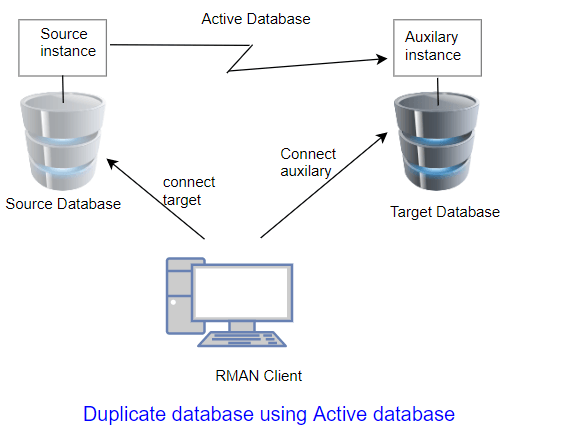
We can use RMAN backup to create the database or use Active database option to directory create standby from Primary without taking backup
Answer
We can use RMAN backup to create the database or use Active database option to directory create standby from Primary without taking backup
With backup
RMAN>
duplicate target database to TEST;
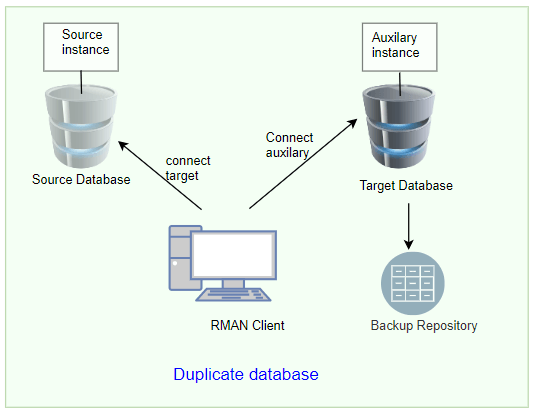
With
Active database
RMAN >RUN
{
CONFIGURE DEVICE TYPE DISK PARALLELISM 6;
duplicate target database to TEST from active database;
}
Question 16
How to
catalog manual/user-managed backup in RMAN ?
Answer
By using catalog command.
i. disk backup pieces you can use:
Answer
By using catalog command.
i. disk backup pieces you can use:
CATALOG
BACKUPPIECE '<handle>';
ii. You can also catalog all the pieces inside of a
directory:
CATALOG
START WITH '<directory>';
iii.If backups are in recovery area, we can catalog the
whole recovery area with :
CATALOG
RECOVERY AREA NOPROMPT;
iv. For tape backup pieces follow:
This is an example using Oracle Secure Backup (OSB):
Define a tape channel in the RMAN automatic configuration:
CONFIGURE
CHANNEL DEVICE TYPE 'SBT_TAPE'
PARMS
'SBT_LIBRARY=/usr/local/oracle/backup/lib/libobk.so,ENV=(OB_MEDIA_FAMILY=RMAN-DEFAULT)';
*. Catalog
the tape backup piece using handle:
CATALOG
DEVICE TYPE 'SBT_TAPE' BACKUPPIECE '0pivagf8_1_1';
Question 18
Do we need to shut down db to change block change tracking
file?
Answer
No need. It can be enabled and disabled online
Answer
No need. It can be enabled and disabled online
SQL>
ALTER DATABASE ENABLE BLOCK CHANGE TRACKING;
Alternatively, you can specify location of block change
tracking file:
SQL>
ALTER DATABASE ENABLE BLOCK CHANGE TRACKING USING FILE '/<path>/bct.ora';
To disable:
SQL>
ALTER DATABASE DISABLE BLOCK CHANGE TRACKING;
View V$BLOCK_CHANGE_TRACKING can be queried to find out the
status of change tracking in the database.
Question 19
How would you start the Oracle database if you lose
your SPFILE and PFILE and your DB crashed with some
error?
Answer
In that case you have remaining option to create new pfile using the non-default parameters recorded in the the alert.log file. You can find this in the previous successful startup entries.
In that case you have remaining option to create new pfile using the non-default parameters recorded in the the alert.log file. You can find this in the previous successful startup entries.
You can then start the database using this pfile (init.ora)
SQL> STARTUP PFILE=’location/init<SID>.ora?’;
Then finally create spfile from this pfile. The below command will automatically create spfile with its original name.
Then finally create spfile from this pfile. The below command will automatically create spfile with its original name.
SQL> Create spfile from
pfile=’location/init<SID>.ora?’;
IF RMAN auto-backup is configured in any of the above
situations, you can restore the same.
RMAN> RESTORE SPFILE FROM AUTOBACKUP;
Question 20
What is a backup retention policy?
Answer
A retention policy describes which backups will be kept and for how long.You can use the CONFIGURE RETENTION POLICY command to create a persistent and automatic backup retention policy. When a backup retention policy is in effect, RMAN considers backups of datafiles and control files as obsolete, that is, no longer needed for recovery, according to criteria that you specify in the CONFIGURE command. You can then use the REPORT OBSOLETE command to view obsolete files and DELETE OBSOLETE to delete them.
A retention policy describes which backups will be kept and for how long.You can use the CONFIGURE RETENTION POLICY command to create a persistent and automatic backup retention policy. When a backup retention policy is in effect, RMAN considers backups of datafiles and control files as obsolete, that is, no longer needed for recovery, according to criteria that you specify in the CONFIGURE command. You can then use the REPORT OBSOLETE command to view obsolete files and DELETE OBSOLETE to delete them.
Question 24
What happens if the retention policy is configured to NONE
Answer
REPORT OBSOLETE and DELETE OBSOLETE do not consider any backups to be obsolete
Answer
REPORT OBSOLETE and DELETE OBSOLETE do not consider any backups to be obsolete
Question 26
What are the types of retention policing in RMAN?
Answer
There are two mutually exclusive options for implementing a retention policy: redundancy and recovery window. If no retention policy is configured by the user, then the REPORT OBSOLETE and DELETE OBSOLETE commands use a default retention policy of REDUNDANCY 1.
Answer
There are two mutually exclusive options for implementing a retention policy: redundancy and recovery window. If no retention policy is configured by the user, then the REPORT OBSOLETE and DELETE OBSOLETE commands use a default retention policy of REDUNDANCY 1.
To configure a retention policy based on a recovery window,
use the following command:
RMAN> CONFIGURE RETENTION POLICY TO RECOVERY WINDOW OF x
DAYS;
To configure a retention policy based on redundancy, use the
following command:
RMAN> CONFIGURE RETENTION POLICY TO REDUNDANCY x;
You can also disable the retention policy completely,
meaning that RMAN does not consider any backup to be obsolete. To do so, use
the following command:
RMAN> CONFIGURE RETENTION POLICY TO NONE;
Question 28
What is Level 0, Level 1 backup?
Answer
A level 0 incremental backup, which is the base for subsequent incremental backups, copies all blocks containing data, backing the datafile up into a backup set just as a full backup would. A level 1 incremental backup can be either of the following types:
A differential backup, which backs up all blocks changed after the most recent incremental backup at level 1 or 0
A cumulative backup, which backs up all blocks changed after the most recent incremental backup at level 0
Answer
A level 0 incremental backup, which is the base for subsequent incremental backups, copies all blocks containing data, backing the datafile up into a backup set just as a full backup would. A level 1 incremental backup can be either of the following types:
A differential backup, which backs up all blocks changed after the most recent incremental backup at level 1 or 0
A cumulative backup, which backs up all blocks changed after the most recent incremental backup at level 0
Question 31
What
are new features in Oracle 12c RMAN?
Answer
a.Fine grained recovery:
With Oracle Database 12c, you can use a simple RECOVER TABLE command to perform a point-in-time recovery of a table/partition without having to go through a manual point-in-time recovery process. This command automatically performs the following steps: creation of the auxiliary instance, table recovery, exporting of the object, and importing it into the production database.b.Support for multi-tenant databases
c . Improved RMAN duplication (cloning)
performance: Now Duplicate database with active database used backup set
instead of image copies and hence improving the performance
d . Separation of Duty using SYSBACKUP role
e . SQL interface in RMAN
f.Expansion of Multi-section support
g. Simplified cross platform migration
Answer
a.Fine grained recovery:
With Oracle Database 12c, you can use a simple RECOVER TABLE command to perform a point-in-time recovery of a table/partition without having to go through a manual point-in-time recovery process. This command automatically performs the following steps: creation of the auxiliary instance, table recovery, exporting of the object, and importing it into the production database.b.Support for multi-tenant databases
f.Expansion of Multi-section support
g. Simplified cross platform migration
Question 32
How to do Listing of backups in RMAN?
Answer
Use LIST to display information about backup sets, proxy copies, and image copies recorded in the repository. The LIST command displays the files against which you can run CROSSCHECK and DELETE commands. Use this command to list:
Answer
Use LIST to display information about backup sets, proxy copies, and image copies recorded in the repository. The LIST command displays the files against which you can run CROSSCHECK and DELETE commands. Use this command to list:
Backups and copies that do not have the status AVAILABLE in the
RMAN repository
Backups and copies of datafiles that are available and can possibly be used in a restore operation
Specified archived logs, backup sets, backup pieces, control file copies, datafile copies, and proxy copies
Backups and copies restricted by tag, completion time, recoverability, or device
Incarnations of a specified database or of all databases known to the repository
Stored scripts in the recovery catalog
Reporting on Database Files and Backups
Backups and copies of datafiles that are available and can possibly be used in a restore operation
Specified archived logs, backup sets, backup pieces, control file copies, datafile copies, and proxy copies
Backups and copies restricted by tag, completion time, recoverability, or device
Incarnations of a specified database or of all databases known to the repository
Stored scripts in the recovery catalog
Reporting on Database Files and Backups
Question 33
What is the difference between LIST and REPORT command
Answer
Report command performs more complex analysis than LIST? Use the REPORT command to answer questions such as the following:
Answer
Report command performs more complex analysis than LIST? Use the REPORT command to answer questions such as the following:
Which files need a backup?
Which files have not had a backup for some time?
Which files are not recoverable due to unrecoverable operations?
Which backup files can be deleted?
What was the physical schema of the database at a previous time
Which files have not had a backup for some time?
Which files are not recoverable due to unrecoverable operations?
Which backup files can be deleted?
What was the physical schema of the database at a previous time
Comments
Post a Comment