FAQS
Question 1. What is oracle
database ?
Answer: Oracle
Database is a relational database management system (RDBMS) which
is used to store and retrieve the large amounts of data. Oracle Database had
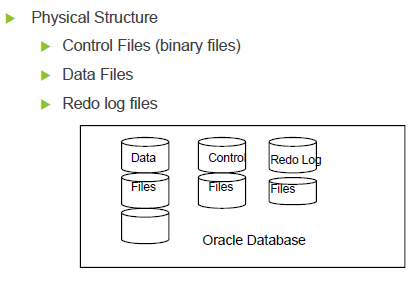
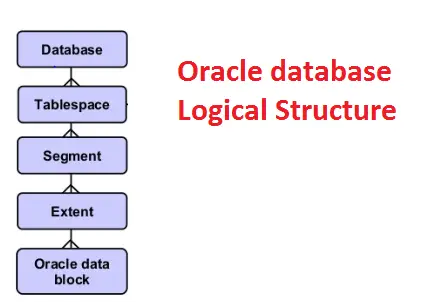
physical and logical structures. Logical structures and physical structures are
separated from each other
Question 2 What
is the difference between Oracle database and Oracle instance?
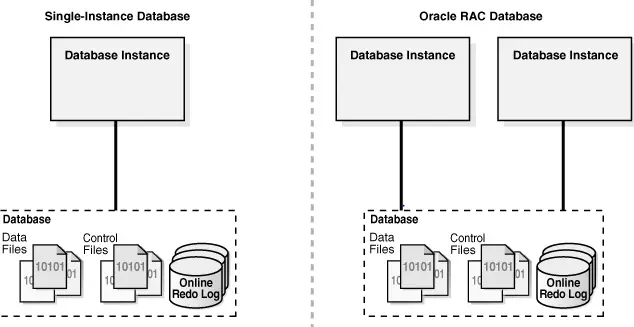
Answer: Oracle database is the collection
of datafiles , redologs and control files while Oracle instance is the SGA
, processes in the Memory.
We can have 1 or more instance serving a oracle database .
In Oracle
RAC, we have one set of datafiles, control file and redo logs while instance on one ore
more boxes accesses the same database
Question 3 What
is a Tablespace?
Answer: Oracle use Tablespace for logical data Storage. Physically,data will get stored in
Datafiles. Datafiles will be connected to tablespace . A tablespace can have
multiple datafiles . A tablespace can have objects from different schema’s and a
schema can have multiple tablespace .
Database creates “SYSTEM tablespace ” by
default during database creation. It contains read only data dictionary tables
which contains the information about the database.
Answer: Oracle use Tablespace for logical data Storage. Physically,
Question 4 What are
Datafiles?
Answer: The
datafiles contain all the database data. The data of logical database
structures, such as tables and indexes,
is physically stored in the datafiles allocated for a database.
Answer
Question 5 what is Control
Files?
Answer: Every
Oracle database has a control file. A control file contains entries that
specify the physical structure of the database such as Database name and the
Names and locations of datafiles and redo log files.
Answer
Question 6 What is Redo Log
Files?
Ans . The
primary function of the redo log is to record
all changes made to data. If a failure prevents modified data from being
permanently written to the datafiles , then the changes can be obtained from the
redo log, so work is never lost.
Question 7 What is Archive
Log Files ?
Answer: Oracle automatically archives log files when the database is in ARCHIVELOG mode. This prevents oracle from overwriting the redo log files before they have been safely archived to another location.
Answer: Oracle automatically archives log files when the database is in ARCHIVELOG mode. This prevents oracle from overwriting the redo log files before they have been safely archived to another location.
Question 8 What is Parameter
Files (initSID . ora )
Answer: Parameter files contain a list of configuration parameters for that instance and database.
Answer: Parameter files contain a list of configuration parameters for that instance and database.
Question 9 What is schema ?
Answer: A user account and its associateddata including
tables, views, indexes, clusters, sequences, procedures,
functions, triggers, packages and database links is known as Oracle schema.
System, SCOTT etc are default schemas. We can create a new Schema/User. But we
can’t drop default database schemas.
Answer: A user account and its associated
Question 10 What is data
blocks ?
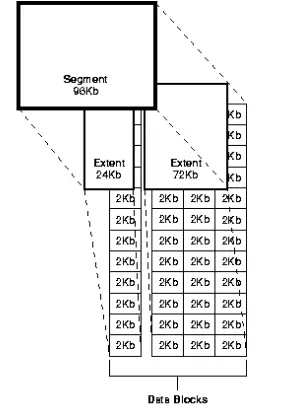
Answer: Data Blocks are the base unit of logical database space. Each data block represents a specific number of bytes of database space on a disk. The data blocks can be 4 K, 8 K size depending on the requirement.
Answer: Data Blocks are the base unit of logical database space. Each data block represents a specific number of bytes of database space on a disk. The data blocks can be 4 K
Question 11. What is an Extent
?
Answer: Extent is a collection of Continuous data
blocks, which is used for storing a specific type of information.
Answer
Question 12. What is a Segment
?
Answer: A segment is a collection of extents
which is used for storing a specific data structure and resides in the same
tablespace .
Answer
Question 13. What is Rollback
Segment ?
Answer: Databasecontain one or more Rollback Segments to roll back transactions and
data recovery.
Answer: Database
Question 14. What is the
different type of Segments ?
Answer
Answer
Data Segment( for storing User Data), Index Segment (for storing
index), Rollback Segment and Temporary Segment.
Question 15. What is
archive-log and No archive log mode?
Answer: We all know that redo logs stored the redo information and redo log files are in circular fashion. Oracle Database lets you save filled groups of redo log files to one or more offline destinations, known collectively as the archived redo log. The process of turning redo log files into archived redo log files is called archiving.
Answer: We all know that redo logs stored the redo information and redo log files are in circular fashion. Oracle Database lets you save filled groups of redo log files to one or more offline destinations, known collectively as the archived redo log. The process of turning redo log files into archived redo log files is called archiving.
The background process ARCn automates archiving operations when
automatic archiving is enabled. The database starts multiple archiver processes
as needed to ensure that the archiving of filled redo logs does not fall
behind. No archive log means archive log are not generated and redo are
overwritten
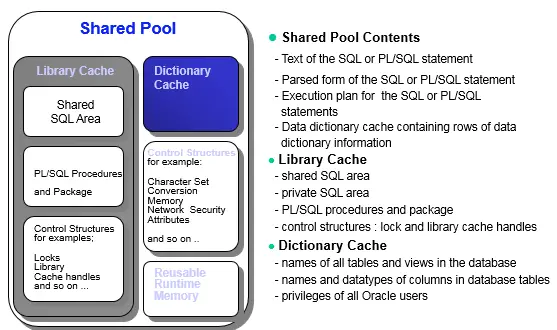
Question 16. What all things
are present in the shared
pool?
Answer: The shared pool portion of
the SGA contains three major areas:
library cache( contains parsed sql statements, cursor information, execution
plans)
dictionary cache (contains cache -user account information, privileges
information, datafile , segment and extent information)
buffers for parallel execution messages control structure.
Question 17. What is hot
backup?
Answer: If the database must be up and running 24 hours a day, seven days a week, then you have no choice but to perform inconsistent backups of the whole database. A backup of online data files is called an online backup. This requires that you run your database in ARCHIVELOG mode.
Answer: If the database must be up and running 24 hours a day, seven days a week, then you have no choice but to perform inconsistent backups of the whole database. A backup of online data files is called an online backup. This requires that you run your database in ARCHIVELOG mode.
Question 18. which views is
used to finding the locking in the database?
Answer: v$lock, v$session, v$process
Answer: v$lock, v$session, v$process
Question 19. You have many
instances running on the same UNIX box. How can you determine which shared
memory and semaphores are associated with which instance?
Answer:
There are two ways
There are two ways
SQL> oradebug setmypid
SQL> oradebug ipc
SQL>oradebug tracfile_name
Another way is to use
$ORACLE_HOME/bin/sysresv
Question 20. What is Database
index ?
Answer:
A database index is a data structure that improves the speed of data retrieval operations on a database table at the cost of slower writes and increased storage space. By
default, Oracle creates B-tree indexes.
Answer:
A database index is a data structure that improves the speed of data retrieval operations on a database table at the cost of slower writes and increased storage space
Answer check the below link for
Detailed explanation
Question 22. What is library
cache lock?
Answer
A library cache lock means that a session is waiting to use or change an object definition or to use a SQL statement that another session isloading , changing
or parsing, or is waiting to change or parse. This usually indicates that
database object definitions are being changed regularly.
A library cache lock means that a session is waiting to use or change an object definition or to use a SQL statement that another session is
Another example is gathering statistics on an object. When statistics are gathered all references
to that object in the shared pool or library cache become invalid, requiring a
new hard parse for each SQL statement referencing the object. Statistics should
only be gathered when there are no active users or system activity is very low.
Question 23. How do we find the
blocker for Library cache lock?
Answer:
We can runhanganalyze to find the blocking session.
We can run
Many times, the below query also works in wonderful manner
select /*+ all_rows */ w1. sid waiting_session,h1. sid holding_session,
w . kgllktype lock_or_pin,w . kgllkhdl address,decode ( h. kgllkmod , 0, 'None ', 1, 'Null', 2, 'Share', 3, 'Exclusive','Unknown') mode_held,
decode ( w. kgllkreq , 0, 'None ', 1, 'Null', 2, 'Share', 3, 'Exclusive','Unknown') mode_requested
from dba_kgllock w, dba_kgllock h, v$session w1, v$session h1
where (((h. kgllkmod ! = 0) and (h. kgllkmod ! = 1)
and ((h. kgllkreq = 0) or (h. kgllkreq = 1)))and (((w . kgllkmod = 0) or (w. kgllkmod = 1))
and ((w. kgllkreq ! = 0) and (w. kgllkreq ! = 1))))and w. kgllktype = h. kgllktype and w. kgllkhdl = h. kgllkhdl and w. kgllkuse = w1. saddr and h. kgllkuse = h1. saddr /
Question 24. How to take
global hanganalyze dump ?
Answer
Answer
ORADEBUG setmypid
ORADEBUG setinst all
ORADEBUG -g def hanganalyze <level>
Question 25. How do you
recover the database if you lost one of the controlfile in the database?
Answer
Answer
Shutdown Instance ( abort )
sqlplus / as sysdba

shutdown abort
Change Init. ora file to remove the lost controlfile or copy the
existing controlfile to that location
startup the database
Check below link for all the useful scenario for recovery
Answer
a. Shutdown Instance (abort)
b . If the control-file backup is available , then restore it from backup
or if you have got the controlfile information in trace using alter database
backup controlfile to trace
c . Once the controlfile is created, recover database using backup controlfile.
You will need to apply the redo logs to complete the recovery
d , alter database open resetlogs;
We can avoid the reset logs by using the steps below
1. After the database is mounted with restore of controlfile from backup , create
a trace of the controlfile using the command below
alter database backup controlfile to trace;
2. Now take out the create controlfile statement from the trace. Choose the NORESETLOG portion
3. Recreate thecontrolfile using the above portion.
4. Do recover database
5.alter database open
2. Now take out the create controlfile statement from the trace. Choose the NORESETLOG portion
3. Recreate the
4. Do recover database
5.
Check below link for all the useful scenario for recovery
Question 27. What is flashback
database?
Answer:
It is New feature in Oracle database post 10.1 onwards. It Uses
past block images to back out changes to a oracle
database. As the name suggest , we can use this flashback database in
previous time
Flashback database explained and limitation
Question 28. How can you
rebuild an index?
Answer: We can rebuild the index
using the below command
If it is to be online
If it is to be rebuild offline
You can use parallel to speed up the rebuild
Question 31. What is High Water Mark in Oracle?
1 High
water mark is the maximum
amount of database blocks used so far by a segment. This mark cannot be reset by delete operations.
4 The high water mark level is just a line separate the used blocks and free blocks.
The blocks above the HWM level is free blocks, they are ready to
use.
The blocks below the HWM level isused blocks , they are already used.
The blocks below the HWM level is
Question 32. What parameters
are used to set parallelism in the database?
Answer:
Following initialization parameters are required for parallelism setup in
database .
PARALLEL_SERVER,
PARALLEL_SERVER_INSTANCES,
PARALLEL_MIN_SERVERS,
PARALLEL_MAX_SERVERS
PARALLEL_THREADS_PER_CPU
Question 33. If the table is
fragmented, how would you rebuild it?
Answer
First we need to rebuild the table
alter table <table_name> move;
Secondly, we need to rebuild all its indexes
Finally, we should gather the stats on the table
Question 35. How do you switch
from an init . ora file to a spfile ?
It will start using spfile
Question 36. You are
experiencing high “busy buffer waits” . how can you find what’s causing it?
Answer Buffer busy wait means that the queries are waiting for the blocks to be read into thedb cache. There could be the reason when the block may be busy in the cache and
session is waiting for it. It could be undo , data block or segment header wait.
Answer Buffer busy wait means that the queries are waiting for the blocks to be read into the
Run the following query to find out the p1, p2 and p3 of a
session causing buffer busy wait
sql > select p1 "File #", p2 "Block #", p3 "Reason Code" from v$session_wait where event = 'buffer busy waits';
After that running the following query to find the segment
causing buffer busy wait:-
sql > select owner, segment_name, segment_type from dba_extents where file_id = &P1 and &P2 between block_id and block_id + blocks -1
Question 37. How to kill the
database session?
Answer
First you need to find the SID, serial# of the sessionselect SID,SERIAL# from v$session where <>;
alter system kill session 'SID,SERIAL#';
in some situations, like waiting for a reply from a remote database or rolling back transactions, the session will not kill itself immediately and will wait for the current operation to complete.So Upon issuing the alter system kill session command, the session will be 'marked for kill'. It will then be killed as soon as possible
For Oracle RAC
If you want to kill session from another instance
ALTER SYSTEM KILL SESSION 'sid,serial#,@inst_id';
Question 38. What is
difference between startup mount and startup nomount?
Answer. startup mount -mount the
control file
startup nomount- does not mount the controlfile
Related Articles
Question 39. How to check Oracle
database version?
Answer
Select * from v$version;
The below matrix explains the number of the Oracle version
|
Major Database Release Number
|
The first digit is the most
general identifier. It represents a major new version of the software that
contains significant new functionality.
|
|
Database Maintenance Release
Number
|
The second digit represents a
maintenance release level. Some new features may also be included.
|
|
Application Server Release
Number
|
The third digit reflects the
release level of the Oracle Application Server (OracleAS).
|
|
Component-Specific Release
Number
|
The fourth digit identifies a
release level specific to a component. Different components can have
different numbers in this position depending upon, for example, component
patch sets or interim releases.
|
|
Platform-Specific Release
Number
|
The fifth digit identifies a
platform-specific release. Usually this is a patch set. When different
platforms require the equivalent patch set, this digit will be the same
across the affected platforms.
|
Let’s take the example of Oracle version 10.2.0.4.0
10 – Major database release number
2 – Database Maintenance release number
0 – Application server release number
4 – Component Specific release number
0 – Platform specific release number
10 – Major database release number
2 – Database Maintenance release number
0 – Application server release number
4 – Component Specific release number
0 – Platform specific release number
Question 40. What is SCN
(System Change Number) ?
Answer The system change number
(SCN) is an ever-increasing value that uniquely identifies a committed version of the database at a point in time.
Every time a user commits a transaction Oracle records a new SCN in redo logs.
Oracle uses SCNs in control files datafile headers and redo records. Every redo log file has both a log sequence number and low and high SCN. The low SCN records the lowest SCN recorded in the log file while the high SCN records the highest SCN in the log file
Oracle uses SCNs in control files datafile headers and redo records. Every redo log file has both a log sequence number and low and high SCN. The low SCN records the lowest SCN recorded in the log file while the high SCN records the highest SCN in the log file
Question 41. How to apply patch to
Oracle database Home software?
Applying patch
cd <patch no>
opatch apply
Rollback
opatch
rollback -id <patch no>
Question 42. How to find
Last password change of a user?
Answer
select du.username, du.profile, du.account_status, u.ptime last_pwd_change
from dba_users du, sys.user$ u
where du.username = u.name and du.username='&1'
order by 2, 4
/
Question 43. What is Physical
Block Corruptions?
Answer
This kind of block corruptions are normally reported by Oracle
with error ORA-1578 and the detailed corruption description is printed in the
alert log.
Corruption Examples are:
Bad header – the beginning of the block (cache header) is
corrupt with invalid values
The block is Fractured/Incomplete – header and footer of the block do not match
The block checksum is invalid
The block is misplaced
The block is Fractured/Incomplete – header and footer of the block do not match
The block checksum is invalid
The block is misplaced
Question 44. What is Row chaining ?
Answer
Row chaining happens when a row is too large to fit into a single database block.
For example, suppose you have 4 KB block size for your database,
and you need to insert a row of 8 KB
into it, Oracle will use 3 blocks and store the row in pieces.
In this case, Oracle stores the data for the row in a chain of
data blocks (one or more) reserved for that segment. So, instead of just having
a forwarding address on one block and the data on another we have data on two
or more blocks. And Row Chaining happens only when the row is being inserted
and whenever it has inserted it cannot be chained.
In most cases chaining is unavoidable, especially when this
involves tables with large columns such as LONGS, LOBs, etc. When you have a
lot of chained rows in different tables and the average row length of these
tables is not that large, then you might consider rebuilding the database with
a larger block size.
Tables with more than 255 columns can potentially force Chaining
Tables with more than 255 columns can potentially force Chaining
Question 45. What is Row Migration ?
Answer
We will migrate a row when an update to that row would cause it to not fit on the block anymore
(with all the «forwarding address». So,
the original block just has the ROWID of
the new block and the entire row is moved.
Question 46. How to find the physical
location of the datafiles,redo logs,controlfile?
Answer
Prompt Control file
Locations
select name
from sys.v_$controlfile
/
Prompt Redo logs Locations
col Grp format 9999
col member format a50
heading "Online REDO Logs"
col File# format 9999
col name format a50
heading "Online REDO Logs"
break on Grp
select group#,member
from sys.v_$logfile
/
Prompt Data Files
Locations
col Tspace format a25
col status format a3
heading Sta
col Id format 9999
col Mbyte format 999999999
col name format a50
heading "Database Data Files"
select F.file_id Id,
F.file_name name,
F.bytes/(1024*1024) Mbyte,
decode(F.status,'AVAILABLE','OK',F.status)
status,
F.tablespace_name Tspace
from sys.dba_data_files F
order by tablespace_name;
Comments
Post a Comment